

claude-code, codex, hermes, or clawboo-native, online so it can execute board tasks. Each runtime is a RuntimeAdapter: Clawboo lists it, installs its CLI, stores its provider key, and reports its connection state. OpenClaw is connected differently (the Gateway, not a CLI install); see OpenClaw.
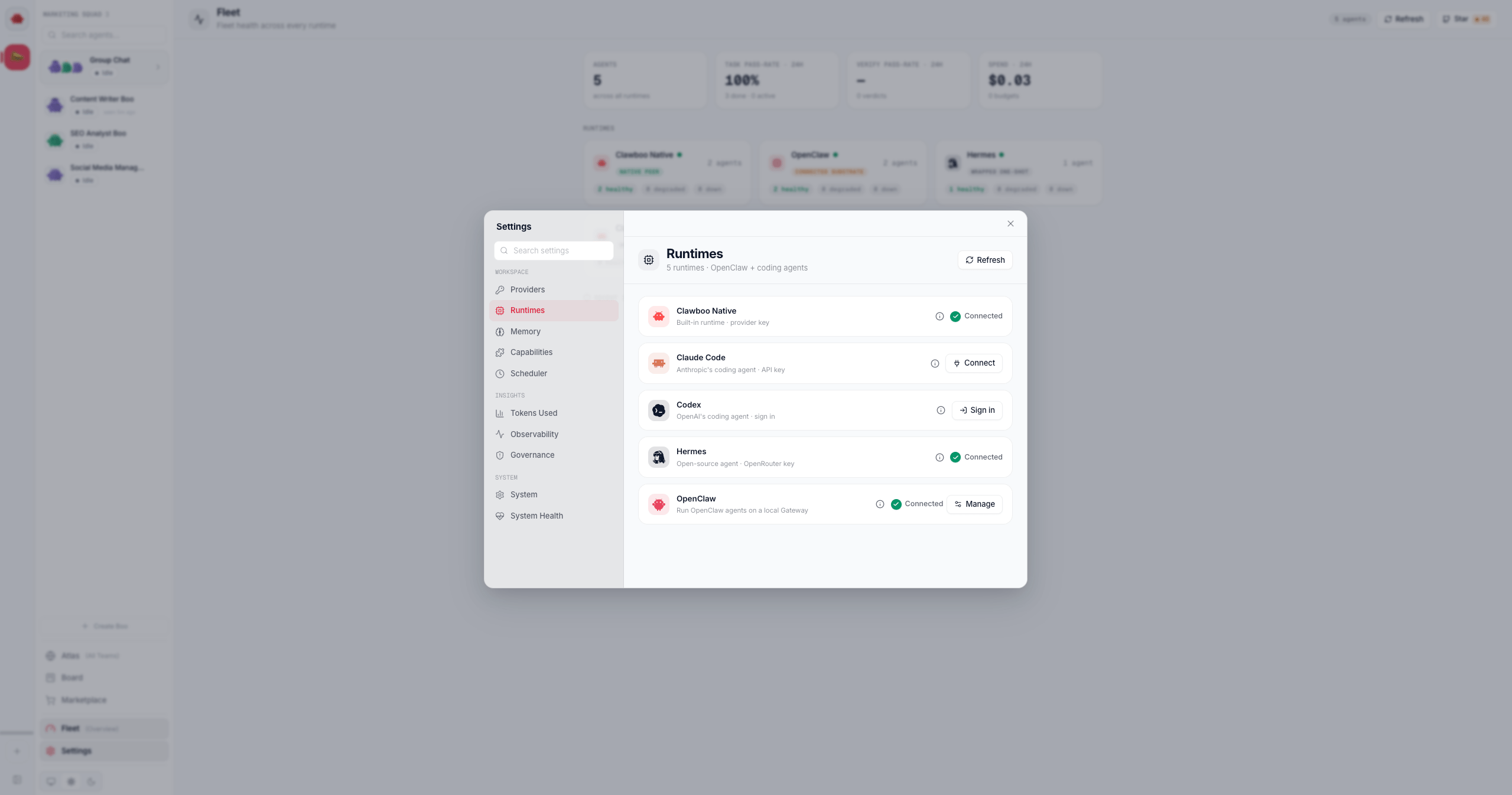
The whole lifecycle runs from the Runtimes panel (RuntimeConnectionCard), backed by /api/runtimes/*. Open it from Settings (the gear at the bottom of the sidebar, or Cmd/Ctrl + ,), then Runtimes under the Workspace group. This page documents what each step does, where keys are stored, and the per-runtime differences.
Prerequisites
The Runtimes panel is always available; every runtime is listed regardless of install or credential state. What changes per runtime is whether it needs a CLI install, an API key, or an interactive terminal login.
claude-code,codex, andhermesare external CLIs Clawboo installs for you.clawboo-nativeships inside the Clawboo server; there is nothing to install.npm(bundled with Node.js) is required to installclaude-codeandcodex.hermesinstalls via Python;pipxis preferred, with apip --userfallback.- A provider API key for the runtimes that authenticate head-less (
claude-code,hermes,clawboo-native).codexauthenticates through an interactive ChatGPT OAuth login instead of a pasted key — andhermesaccepts the same ChatGPT-subscription login as a keyless ALTERNATIVE (hermes auth add openai-codex, then Re-check; see Hermes).
At a glance
Every runtime resolves to one connection state that drives the card UI. The state is derived frominstalled + hasCredential + the runtime’s auth model, and is recomputed (never echoing any secret) after each action.
Per-runtime matrix
Steps
1. List the runtimes
GET /api/runtimes returns { runtimes, available }. Each runtimes[] entry carries the adapter’s participantKind, capabilities, and health, plus its install/auth status (installed, binPath, builtIn, authKind, envVar, hasCredential, installCommand, docsUrl, connectionState). The available[] list is the full descriptor catalog (no secrets) so the panel can render “available to add” cards for runtimes you have not connected yet.
A built-in runtime (clawboo-native) always reports installed: true with binPath: null. A CLI runtime reports installed based on whether resolveRuntimeBin finds its health binary; this probe checks PATH and the well-known user-install dirs (the pip --user / pipx location), which is how Hermes is found even though its Python user-site bin is usually off the server’s PATH.
2. Install the CLI (claude-code, codex, hermes)
POST /api/runtimes/:id/install is a Server-Sent Events stream. The card opens it from the not-installed state and renders the install log in a terminal box. Events:
- npm runtimes (
claude-code,codex) runnpm install -g <pkg>. Ifnpmis not found, the stream emitserrorwith codeNPM_MISSING. - The pip runtime (
hermes) preferspipx install <pkg>. Ifpipxis absent it falls back topython -m pip install --user <pkg>, and if it detects a PEP-668 externally-managed environment it retries once with--break-system-packages. If neitherpipxnorpythonis found it emitserrorwith codePYTHON_MISSING. Ifpipxis absent and the only Python it can resolve is older than the runtime’s minimum (3.11 for Hermes), it emitsPYTHON_TOO_OLDinstead, naming the version it found and suggesting a newer Python orpipx. - Calling install on a built-in runtime returns
400(plain JSON, the SSE stream never opens);clawboo-nativehas nothing to install.
3. Connect (api-key runtimes)
POST /api/runtimes/:id/connect with body { apiKey, provider? } stores the key in the encrypted vault and returns the recomputed connectionState. The key is trimmed. An empty key returns 400 ({ error: "apiKey is required" }), with one exception: for clawboo-native with an explicit provider, omitting apiKey is a keyless reconnect against a key that already resolves for that provider (200, nothing stored). That is what the Providers manager’s one-click Use sends; when nothing resolves for that provider the 400 reads no existing key found for <provider> instead. The response never echoes the key.
The card sends the key from the needs-auth state (the input label is the runtime’s envVar, with a show/hide toggle). On success it clears the input and re-fetches status, which flips the card to ready.
For clawboo-native the optional provider field routes the key to the right vault slot. Without it, the key lands in ANTHROPIC_API_KEY; with provider: "openai" or "openrouter" it goes to that provider’s env var (validated against the runtime’s known set), and provider: "ollama" is a keyless no-op (nothing is stored).
4. Connect (codex, oauth)
codex cannot be connected with a pasted key on current versions. POST /api/runtimes/codex/connect is a no-op on storage that probes the login (codex login status) and returns the CURRENT state — ready when you are already signed in, else:
codex login for you; the CLI opens your browser and you approve there — no code to type). The manual codex login command remains the fallback: run it in a terminal, then click Re-check. A signed-in Codex is detected by the status probe (the token file is never read), and each spawned run gets a managed CODEX_HOME seeded with a copy of your ~/.codex/auth.json; Clawboo does not store a Codex credential in its vault. The subscription’s primary home is the Providers page (the ChatGPT subscription row) and the onboarding wizard’s OpenAI card (see Codex); once it is connected, the Hermes and OpenClaw surfaces offer their own optional subscription links.
5. Health-check a provider key
POST /api/runtimes/clawboo-native/healthcheck with body { provider, apiKey? } verifies a credential before anything commits to it. Every clawboo surface that takes or reuses a key runs this first — the onboarding step on Continue, the Providers hub on Save, the runtime connect card before it writes the vault, and the Providers manager’s Use before it reconnects on a saved key. On the normal path a credential that doesn’t answer is not stored: the surface shows the reason inline and stops. Each one also offers an explicit override — Continue anyway / Save anyway / Connect anyway / Use anyway — and choosing it deliberately stores the credential unverified, so a provider this machine simply can’t reach can’t strand you.
It makes a single authenticated GET to the provider’s lightweight models/health endpoint:
It returns
{ ok: true } on a 2xx, or { ok: false, error } on a bad key (401/403 → “Invalid API key.”), an 8-second timeout, or a network failure. The key is used for exactly that one fetch, never persisted to the vault, never logged, never echoed. This route is only valid for clawboo-native; any other runtime id returns 400. apiKey is optional — omit it to probe the key already stored for that provider; 400 if nothing is stored either. An unknown provider also returns 400.
6. Disconnect
POST /api/runtimes/:id/disconnect deletes the runtime’s stored credential and returns the recomputed connectionState. It keeps the CLI installed, so the card drops from ready to needs-auth. A connected runtime shows the button in its Manage body, and it confirms first, since you will need to re-enter the key to reconnect. For codex the button is labelled Sign out and calls the logout route below instead; POST /api/runtimes/codex/disconnect (no envVar) has no stored credential to delete and is not wired to any button.
7. Sign out (codex)
POST /api/runtimes/:id/logout is the oauth counterpart to Disconnect. It runs the CLI’s own codex logout, invalidates the cached auth probe, and re-probes, so the returned connectionState reflects the real post-logout state. It returns 404 ({ error: "runtime '<id>' has no sign-out" }) for an api-key runtime, which uses /disconnect, and 400 if the CLI is not installed.
Where keys are stored
API keys live in an encrypted vault at~/.clawboo/secrets/runtime-keys.json (under resolveClawbooDir(); the CLAWBOO_HOME override applies), keyed by env-var name. Each value is encrypted with AES-256-GCM under a 32-byte master key at ~/.clawboo/secrets/master.key (mode 0600, inside a 0700 dir). CLAWBOO_SECRETS_MASTER_KEY overrides the on-disk key (32-byte base64, 64 hex chars, or a raw 32-char string).
At run time the key is resolved by resolveRuntimeKey(envVar), highest priority first:
process.env[envVar]- the encrypted vault (decrypt)
- OpenClaw’s
~/.openclaw/.env
This is defense in depth. The decrypted value is never logged, never returned in an HTTP response body, and never written to SQLite, audit, or observability records; it flows only into a spawned runtime process’s environment. A wrong, rotated, or lost master key fails closed (resolution returns
null); it never throws into a request or leaks partial plaintext.Verify it worked
- Re-fetch
GET /api/runtimes(or click Re-check in the card). The runtime’sconnectionStateshould readready, and itshealth.okshould betrue. - For CLI runtimes,
healthreports the binary presence; forclawboo-native,healthreports whether any routable provider key (orOLLAMA_BASE_URL) resolves. - Run a board task on the runtime via
POST /api/runtimes/:id/run; the connected key is injected from the vault into the spawned process’s environment.
Troubleshooting
POST /api/runtimes/:id with an unknown :id returns 404 ({ error: "unknown runtime '<id>'" }). Only claude-code, codex, hermes, and clawboo-native are valid ids; OpenClaw is not a /api/runtimes runtime.Related
- Runtimes overview: the capability matrix
- Clawboo Native · Claude Code · Codex · Hermes
- OpenClaw: the Gateway runtime (different connection model)
/api/runtimesreference: full request/response shapes- Security: the vault, redaction, and safe exposure
- Environment variables:
CLAWBOO_HOME,CLAWBOO_SECRETS_MASTER_KEY,OLLAMA_BASE_URL