

teams) plus the agents whose team_id points at it; everything else (the group chat, the Ghost Graph scope, Boo Zero’s per-team brief, the durable rules) hangs off that row.
You manage teams from two places in the dashboard: the team sidebar (the leftmost 60px column, TeamSidebar) for creating, switching, archiving, and deleting, and the team header inside a team’s group chat (GroupChatViewHeader) for its brief and rules. Both are backed by /api/teams* and /api/team-rules/*.
For a guided first run, start with Deploy your first team. For the conceptual model (why a team has a shared plane and a private plane), see Teams and planes.
Prerequisites
A team is a Clawboo-native record. Deploying a populated template creates each agent through the runtime you pick for it: a Clawboo Native or coding-runtime agent is created server-side with no OpenClaw Gateway, while an agent you put on OpenClaw needs a live Gateway connection. Because an unavailable OpenClaw suggestion degrades to Clawboo Native, a marketplace team still deploys fully native when the Gateway is offline. Creating an empty team and a template with zero agents both work with nothing connected.
- The dashboard is open and connected (see Connecting runtimes or the OpenClaw quickstart).
- Optional: a marketplace template in mind. The catalog ships 85 teams across nineteen packs, two first-party and seventeen adapted from upstream repositories.
Steps
1. Open the team browser
In the team sidebar, click the dashed + button (title="Create a team"). It takes you to the Marketplace → Teams tab, the one canonical place to browse and deploy a team. Press Deploy on any team card (or the Start from scratch card, for a blank team) to open CreateTeamModal at its customize step.
The modal is a four-step flow (pick → customize → deploy → complete), but the pick step only appears on the first-run welcome screen, before you have any teams; every other entry, the marketplace Deploy buttons and Start from scratch, jumps straight to customize. When the pick step does show, it renders the same team showcase described next.
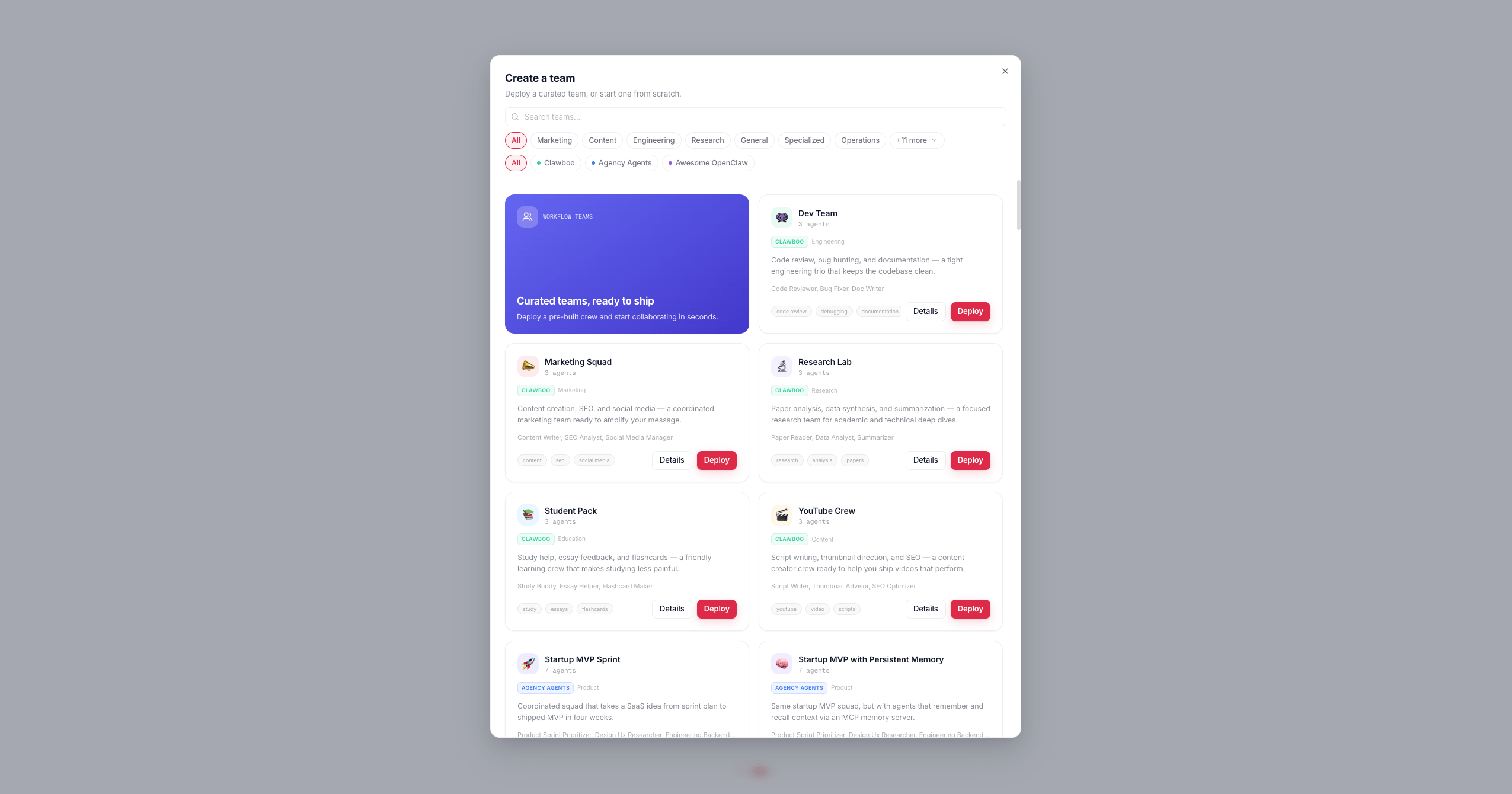
2. Browse the team showcase
The Teams tab, and the first-run pick step, list the team catalog with a search box and two filter rows:- Category pills: the popular categories inline, the rest folded under a +N more toggle; only categories that actually have templates render.
- Source pills:
All,Clawboo,Agency Agents, each with a colored dot.
New Team / 👻 placeholder and no agents.
3. Customize the team
The customize step has three sections:
The accent color and the teammate color collection are independent: the accent tints the team badge and its Ghost Graph halo, while the collection decides how the member Boos are colored. The roster preview seeds its palette with a client-minted team id so the colors you see here match the deployed team exactly (per-team hue rotation).
The eight color collections are
vivid-pop, dusty-pastel-pro, coastal-mist, executive-jewel, sharp-saas, soft-neutral-editorial, monochrome-accent, and classic. classic is the default and uses the legacy per-Boo tints (it ignores the hue-rotation seed).
Every agent in the roster preview also carries its own runtime dropdown, Clawboo Native, OpenClaw, or any connected coding runtime (Claude Code, Codex, Hermes), so one team can mix runtimes; there is no separate “native team vs OpenClaw team” choice. Each row defaults to a smart suggestion (a marketplace team suggests OpenClaw, a blank team suggests Clawboo Native) that degrades to Clawboo Native with an inline note when the suggested runtime is not connected, so the deploy always succeeds. A genuine leadership role is badged Leader, but every agent, the leader included, picks its own runtime; clicking a disabled OpenClaw option opens the OpenClaw setup flow in Settings.
Agents on Clawboo Native, OpenClaw, and Hermes also get an inline model dropdown beside the runtime pill (Hermes routes every model through OpenRouter, so its dropdown is the live OpenRouter catalog; Codex and Claude Code run the delegated task with their own account/SDK default and have no picker). The picker is two-layer: choose a provider first, from the ones you have actually connected, then a model from that provider’s catalog. Rather than an opaque “Recommended”, the trigger names the model that will really run (Default · <model> when you have not overridden it), and the panel opens on the provider the current model belongs to; a long catalog such as live OpenRouter gets a scoped search box. A native pick lands on AgentConfig.primaryModel, an OpenClaw pick writes a per-agent override into openclaw.json, and a Hermes pick is stored in the agent’s execConfig. Switching a row’s runtime clears its model pick, since a model id belongs to one runtime’s catalog. You can change any agent’s model later from its detail view.
The footer button is the primary action; its label changes with context: Create team (empty), Deploy team (template), or Create agent (single-agent deploy from the marketplace’s agent “Deploy” button).
4. Deploy
Pressing the action button issuesPOST /api/teams. The request includes the client-minted id (a UUID, so the deployed palette matches the preview), name, icon, color, colorCollectionId, and templateId. The handler validates the id against a UUID regex and falls back to a server-minted id otherwise. name, icon, and color are all required; omit any and the route returns 400.
For an empty team the modal closes immediately. For a template team the modal enters the deploy step and creates each agent in order:
Along the way the deploy loop also:
- Deduplicates names against your existing agents and teams (auto-suffixing on a collision) so a second deploy of the same template does not clash.
- Writes per-agent files:
SOUL.md,IDENTITY.md,TOOLS.md, an enhancedAGENTS.md(team roster + collaboration protocol), and a workspace-rootCLAWBOO.mdreference. - Generates Boo Zero’s per-team brief (
PUT /api/boo-zero/team-briefs/:id, best-effort). - Enables agent-to-agent coordination (
PATCH /api/system/openclaw-config { agentToAgent: { enabled: true } }) if any agent’sAGENTS.mdhas@-routing, non-fatal if it fails.
Leaders
A team’s leader is not forced to the first agent. Clawboo’s model is:- Boo Zero is the universal leader of every team. It is teamless in the database and participates in each team via a team-scoped session.
teams.leaderAgentIdis the optional team-internal lead, a second-tier coordinator that sits below Boo Zero. The deploy loop sets it only when it detects a genuine leadership role in the roster (CTO, Team Lead, and similar archetypes). When no leader role is detected, thePATCH /api/teams/:idwritesnullso the column stays accurate on re-deploys.
resolveTeamLeader resolves the effective leader in priority order: Boo Zero if it exists in the fleet, else the team-internal lead if it is a member of this team, else the first member, else null (an empty team with no Boo Zero).
To change the internal lead later,
PATCH /api/teams/:id with { "leaderAgentId": "<agentId>" } (or null to clear it). The PATCH body accepts any subset of name, icon, color, colorCollectionId, isArchived, and leaderAgentId.Team rules
Team rules are durable, user-set instructions injected into the message preamble for every team agent and every Boo Zero turn in this team. They exist because corrections you type in chat (“you are not sub-agents”, “delegate via<delegate>, don’t do the work yourself”) roll out of the last-few-messages context window and get forgotten; rules survive across sessions. They are stored in the settings table under the key team-rules:<teamId>, capped at 4000 characters server-side.
There are two ways to set them.
From the rules editor (gear in the team header)
Inside a team’s group chat, click Brief & Rules (the gear button inGroupChatViewHeader). This opens TeamSettingsSheet, which stacks the team’s icon/accent/collection pickers, the per-team Brief, and the Rules editor.
The Rules editor (TeamRulesEditor) is a plain textarea, one rule per line. It loads via GET /api/team-rules/:teamId and saves the whole text via PUT /api/team-rules/:teamId with { content }. The Save button is disabled until the content is dirty.
From the /rule slash command
In the team chat composer, type /rule <text> and send. This is intercepted before the message is routed to any agent:
- line (deduping an exact duplicate, case-insensitively), and saves via PUT /api/team-rules/:teamId. It drops one meta confirmation entry into the merged team transcript and shows a toast; the message is never sent to a runtime.
The
/rule prefix must be followed by whitespace and a non-empty body. /rule alone, /rules, or /rule: do not trigger the command; they fall through and are sent as a normal message.Color collections
Two color choices are independent:- The accent color (
teams.color) tints the team badge in the sidebar and the team’s Ghost Graph halo. Pick it in the customize step or later in the settings sheet (TeamAccentPicker). - The color collection (
teams.colorCollectionId) decides how member Boos are colored. Pick it withTeamColorCollectionPickerin the customize step or the settings sheet. The roster preview updates live.
PATCH /api/teams/:id (the sheet does it optimistically; the store updates first, then persists).
Archive and delete
Right-click a team’s icon in the sidebar to openTeamContextMenu. It has four actions:
Both delete actions prompt with a
window.confirm first. Delete team only keeps your agents; they just become unassigned. Delete with agents permanently removes the agents from the runtime before removing the team; if the connection drops mid-loop you may get a partial result and a toast reporting how many of N were removed.
DELETE /api/teams/:id also cleans up the team’s durable settings rows: team-rules:<teamId> and team-onboarding:<teamId>, and the boo_zero_team_briefs row FK-cascades. Deleting a team therefore discards its rules, onboarding state, and Boo Zero brief permanently. There is no migration ladder and no undo; archive instead if you only want to hide it.Verify it worked
GET /api/teamsreturns the team with anagentCount(a subquery overagents.team_id). A freshly created empty team reportsagentCount: 0; a deployed template reports its member count. The response also includes anassignmentsarray ({ agentId, teamId }) so the client can patch its fleet store.- Pass
?includeArchived=truetoGET /api/teamsto see archived teams; without it, archived teams are filtered out. - After deploy, the team’s group chat opens and its Ghost Graph shows the new Boos. The header Brief & Rules button is present once a team is active.
- After
/rule, re-open the rules editor (orGET /api/team-rules/:teamId); your line should be present as a-bullet.
Troubleshooting
Related
- Deploy your first team, the guided happy path
- Teams and planes, the conceptual model (shared plane vs private plane)
- Group chat, the team chat surface and the Know-Your-Team gate
- Boo Zero, the universal leader, briefs, and display name
- The Ghost Graph, the per-team graph scope and halos
- Marketplace, browse and deploy the 436 agents / 85 teams
/api/teamsreference, full request/response shapes