

ObsPanel), backed by the /api/obs/* routes. Observability is always on; there is no feature gate to enable, and the handlers serve unconditionally.
Prerequisites
- A team that has executed at least one board task (delegation, tool calls, cost). A fresh install with no runs shows empty states everywhere.
- Nothing to install; the panel ships in the Clawboo server.
Where it lives
Open Settings (the gear at the bottom of the sidebar, orCmd/Ctrl + ,), then Observability under the Insights group (the Activity icon). The Cmd/Ctrl+1–4 quick-nav slots cover four of the sidebar surfaces (Atlas, Fleet, Marketplace, Board); Observability, like the other Settings panels, is reached through the Settings modal instead.
The panel is two columns:
- Left column (fixed width): three stacked sections: Fleet health, Error taxonomy, and the Traces list.
- Right column: the Eval scorecard at the top, then the selected Trace with its metrics bar and span-nested timeline, then the Delegation graph.
Steps
1. Read the traces list and open one
A trace groups every event that shares atraceId, the full multi-agent task, from the leader through its specialists down to individual tool calls. The panel derives the Traces list from the recent event feed (GET /api/obs/events?order=desc&limit=300), showing the newest traces first with an event count and timestamp, capped at 40 entries.
Click a trace to open it. The panel fetches GET /api/obs/traces/:traceId (all events for that id, ordered causally by seq), and renders two things in the right column:
- A metrics bar computed from the trace’s events:
- cost: total USD for the run
- tokens: input → output token counts
- tok/min: output tokens per minute over the observed window
- tools: total tool calls
- tool err: failed tool results / total tool results, shown as a percentage (amber when above 0%)
- A span-nested timeline: each event indented by its span depth, following the
span_start→parentSpanIdchain. A child task’s run nests visually under its parent’s. Errors render in the accent color, span markers in mint, cost events in amber.
2. Triage the fleet
The Fleet health section (GET /api/obs/health) projects each agent into the fleet-health triage taxonomy. An agent with an open execution (started but not completed) is:
Each row shows the agent id, an open-run count, the status, and the agent’s spend. A
zombie is what orphan reconciliation will reap on the next server boot.
3. Scan the error taxonomy
The Error taxonomy section (GET /api/obs/errors) groups error events by their class and counts them, sorted by frequency. Clawboo classifies every runtime/tool failure into a fixed set of expected classes:
InvalidArgs · ContextOverflow · Timeout · ProviderError · RateLimited · UserAborted · UnexpectedEnv · Unknown
The classifier matches the error’s code and message against ordered rules. ContextOverflow catches oversized-input failures, and its rule is checked ahead of the InvalidArgs rule so a “context length exceeded” 400 lands there instead of in the generic bad-request bucket; it is an expected recoverable condition, not a harness bug. Anything that matches none is Unknown; and Unknown is treated as a harness bug: it is flagged in the panel (an accent-colored badge plus a “harness bug” label) and counted in the section header (N bugs). An unrecognized failure is treated as a defect in Clawboo’s own error handling, not a normal runtime hiccup, so it alerts rather than being swallowed.
The error feed is also the agent-readable “what errored in the last window” query; pass ?since=<ms> to scope it, or ?harnessBug=true to return only the harness bugs.
4. Follow the delegation graph
The Delegation graph section (GET /api/obs/graph) is the event-sourced projection of the task graph: task nodes (with status and cost), delegation edges (a parent task spawned a child), and dependency edges (a task is blocked on another). The legend distinguishes the two edge kinds: a solid arrow for delegation, a dimmed arrow for dependency. Each row reads source → target kind. This is the same projection that drives the live overlay on the Ghost Graph.
5. Run the smoke evals
The Eval scorecard at the top of the right column has a Run smoke evals button. Clicking it sendsPOST /api/eval/smoke and renders the real SuiteReport.
This runs the deterministic SMOKE_TASKS suite, the exact subset CI runs, with no live model, no API keys, no executor, and no network. Each trial executes against an ephemeral temp-dir SQLite board, so your real clawboo.db is never touched and nothing pollutes the Board / Fleet / Observability views. The body accepts { trials?, k? }, both clamped to [1, 3] so the route can never become a load generator; the scorecard calls it with { trials: 1 }.
The report renders:
- pass@1: fraction of tasks where at least one trial succeeded
- pass^k: fraction where all
ktrials succeeded - k and tasks counts
- A per-task table: task id, suite (
capability/regression), kind (coding/research/coordination), per-task pass@1, and mean score.
±verifier × ±structured-state scorecard as a shape, explained, not run; a CI only pill marks it. The four variants (full, −verifier, −structured, none) and the two contribution rows (verifier, structured-state) are listed with em-dash placeholders. The ablation is a harness self-test (the 4 variants toggle the harness’s own subsystem flags); it runs only from the manual evals.yml workflow, never from this button, and no live-model judge is wired into it yet.
6. Watch the live activity terminal
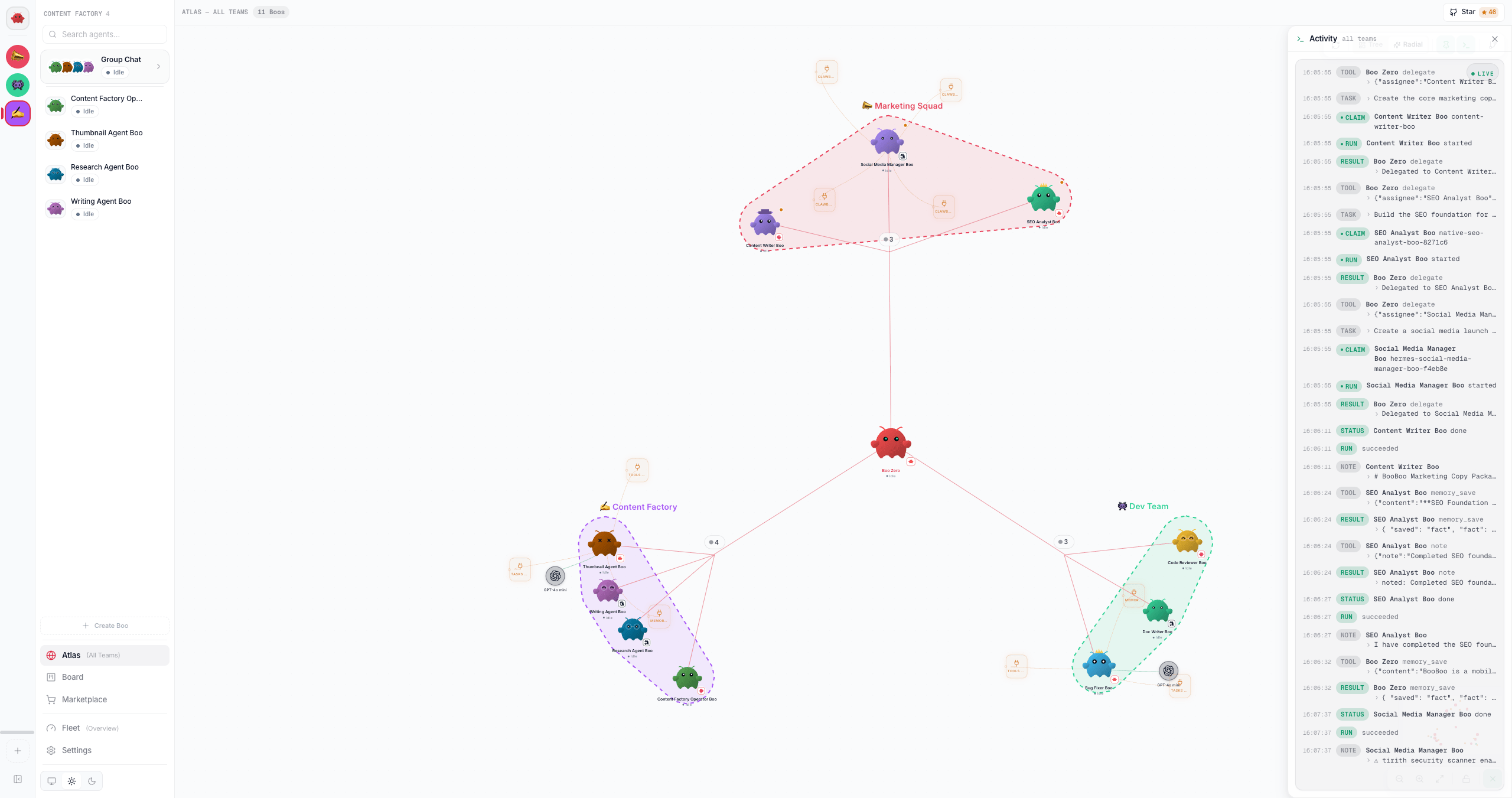
ActivityTerminal, a console that backfills the recent window (GET /api/obs/events) then live-tails the SSE stream (GET /api/obs/stream). It renders tool calls, tool results, errors, cost, and lifecycle events for every runtime uniformly, with a Live / Reconnecting pulse, tabular timestamps, and expandable tool I/O. It is mounted at four scopes:
Every runtime’s activity reaches the event log server-side: the executor runner emits for the native and coding-agent runtimes, and the server-side team orchestrator emits
tool_call / tool_result / error (and cost) for OpenClaw as it drives each turn. OpenClaw has a second server-side writer, because an OpenClaw Boo also works when nobody in Clawboo asked it to: a session watcher reads every committed transcript row and emits tool_call / tool_result for runs started outside Clawboo, such as a cron job the Boo owns, an incoming message on one of its channels, or someone at OpenClaw’s own terminal. A run’s own stream is addressed to whoever started it, which for those runs is nobody, so watching committed rows is what makes them visible at all. The two writers overlap on every run Clawboo did start, so they share a ledger of tool-call ids and the watcher skips a call the runner already logged; a session whose OpenClaw agent id does not resolve to an agent in your fleet is dropped rather than filed under a guess. A POST /api/obs/ingest route remains as a defensive mirror for browser-observed runtime events, restricted to tool_call, tool_result, error, grant_decision and connector_health; board lifecycle events are always emitted server-side and are never accepted from the browser. This is what makes the terminal uniform across runtimes.Options and variations
The read endpoints share a query vocabulary:health and graph fold the most recent 5000 events for the requested scope, so both surfaces keep tracking current activity however long the log has been accumulating. An agent or task whose events have scrolled out of that window stops appearing.
The SSE stream (GET /api/obs/stream) is a short-interval DB-tail on the seq cursor. EventSource reconnects automatically and resumes from the last seq via its Last-Event-ID header (or ?since=). Each event’s data is redacted before it reaches the browser; credential-shaped keys and values are masked, while numeric cost and token fields survive.
Verify it worked
- Open Observability with at least one completed board task. The header badge reads
N tasks · M agentsinstead ofevent log. - Click a trace; the right column shows the metrics bar (non-zero cost/tokens for a real run) and the indented timeline.
- The Fleet health section lists your agents with a status pill. A finished run reads
idle. - Click Run smoke evals; the scorecard fills with
pass@1/pass^kand the per-task table within a second or two. (If it fails, the panel shows “Smoke run failed; check the server log.”)
Troubleshooting
See also
- Observability: the event log, projections, and builder≠judge model
/api/obsreference: full request/response and SSE event shapes, plus/api/eval/smoke- Events and errors reference: every orchestration event kind and the error taxonomy
- The board: per-task activity and execution ledger
- Ghost Graph: the live graph overlay sourced from the same projection
- Agents: the per-agent Activity tab