

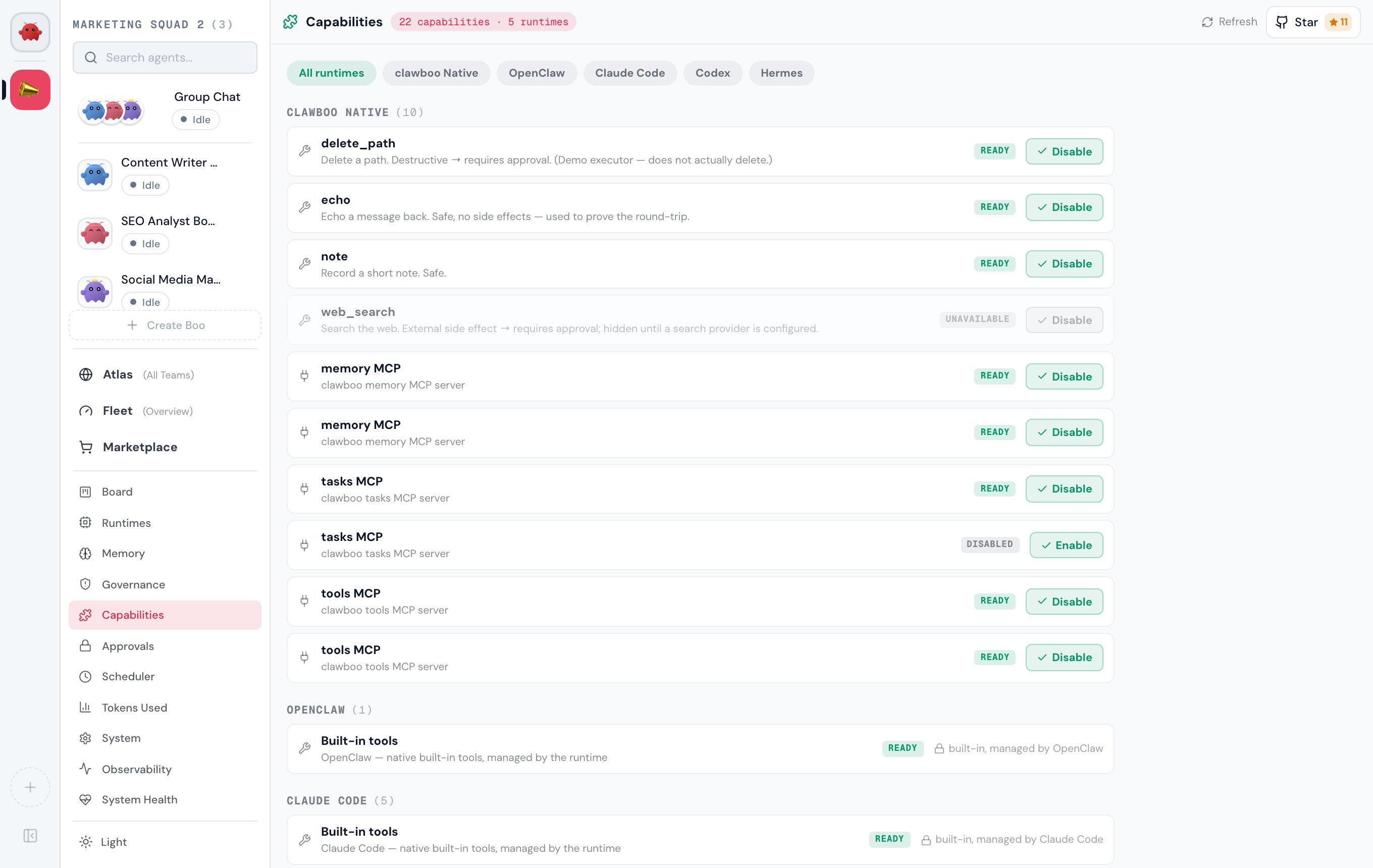
CapabilitiesPanel, backed by GET /api/capabilities and POST /api/capabilities/:action.
Prerequisites
The Capabilities panel is always available; the inventory subsystem is always on. What it shows depends on which runtimes you have connected and what skills you have installed.
- At least one runtime to read capabilities from.
clawboo-nativeis built in and always contributes rows; connectingopenclaw,claude-code,codex, orhermesadds their capabilities. See Connecting runtimes. - Nothing else: reads are non-destructive, and a disconnected source degrades to its last-known rows rather than blanking the inventory.
Where it lives
Open Settings (the gear at the bottom of the sidebar, orCmd/Ctrl + ,), then Capabilities under the Workspace group (the puzzle-piece icon). There is no Cmd/Ctrl number shortcut for this view.
The header shows a live count pill (N capabilities · M runtimes) and a Refresh button. The diagnostics drawer elsewhere in the app can also deep-link here with a runtime pre-selected.
How to read the inventory
Groups: runtime → kind
Rows are grouped by the runtime that owns the capability, in a fixed order (clawboo-native, then openclaw, claude-code, codex, hermes, human). Each group header shows the runtime label and a count. Within a group, rows sort by kind, then alphabetically by name.
There are three kinds, each with its own icon:
When more than one runtime contributes capabilities, a row of filter pills appears above the groups: All runtimes plus one pill per runtime. Click a pill to narrow the view to a single runtime.
Availability badges
Every row carries aStatusPill derived from the record’s availability and status:
An unavailable row is rendered greyed (reduced opacity plus a grayscale filter) because its declarative availability requirement, an auth credential, a config value, an env var, or a plugin, is not satisfied. The server evaluates availability into
available plus a diagnostics list; an unavailable row never offers an Enable/Disable button, so the action set reads consistently with the greyed presentation.
Manageability-derived actions
The action on the right of each row is a pure function of the row’s manageability tier, never a per-runtime literal in the UI:
A few rows look manageable by tier but still render no button, by design:
- An observe-only row shows
built-in, managed by <runtime>with a lock or eye-off icon and no action. - An unavailable (greyed) row offers no action even if its tier is managed; its requirement is unmet.
- A
runtime-of-recordrow whose owning source can’t yet write it (the source setswritable: false, e.g. an OpenClaw connector or plugin whoseconfig.patchwrite is a follow-up) renders no dead button. - A
manageable-but-pending-authrow renders a disabled Enable button carrying the source’s hint; for a Codex connector the hint ispending auth — run \codex login“.
The dashboard’s per-row action set is intentionally Enable/Disable only. Installing a skill lives in the Marketplace, and approving a tool call flows through the tool-approval queue embedded at the top of this panel (see Approvals). The full managed action set is satisfied across those surfaces, not duplicated here.
Steps
Enable or disable a capability
- Open Capabilities from the sidebar.
- Find the row. Use a runtime filter pill or scroll to its group.
- Confirm the action is offered: the row has an Enable (mint) or Disable (neutral) button. If it shows
built-in, managed by <runtime>, it is observe-only and cannot be changed here. - Click the button. The row goes busy (a spinner replaces the action icon) while
POST /api/capabilities/enable(or/disable) runs with{ id }. - On success the panel refreshes and re-reads the inventory, so the pill flips (
Disabled↔Ready).
422 because the row is observe-only or not writable, a toast surfaces the typed error, and the inventory is not refreshed because nothing changed.
Refresh / handle a degraded source
- Click Refresh in the header to re-read every source.
- If a source is degraded (a disconnected Gateway, a missing runtime home), a warning banner names the source and its reason, and the dashboard shows that source’s last-known capabilities rather than dropping them. Reconnect the source, then Refresh.
How it’s wired
GET /api/capabilities accepts optional runtime, kind, scope, and agentId query filters and returns one merged view { records, sources }. The service fans the source adapters, persists each healthy source’s rows (source-scoped reconcile), serves last-good rows for any degraded source, and de-dupes fresh-wins by id. The browser client treats a failed fetch as ok: false so a total failure reads as an error with a Retry, not as an empty inventory.
POST /api/capabilities/:action handles enable, disable, install, and approve. The server re-resolves the target row and gates enable/disable the same way the UI does: an observe-only or non-writable row returns 422; a missing row returns 404. The approve action reuses the existing tool-approval handshake; there is no second approval path.
Options / variations
Verify it worked
- After an Enable/Disable, the row’s pill flips between
ReadyandDisabledand the header count is unchanged. - A direct
GET /api/capabilitiesreturns the row with the updatedstatus. - A rejected action raises a toast and leaves the inventory untouched; that is the expected response when you try to act on an observe-only or non-writable row.
Troubleshooting
An OpenClaw connector or plugin has no Enable/Disable button. Some OpenClaw
runtime-of-record rows are read-only in the dashboard (their config.patch write is a follow-up); the source marks them non-writable so the UI never shows a dead button. The Gateway tools.allow/deny surface is the writable runtime-of-record one.Related
- Capabilities (concept), the inventory model and manageability tiers
/api/capabilitiesreference, full request/response shapes- Connecting runtimes, bring runtimes online so they contribute capabilities
- Marketplace, install curated skills
- Approvals, the tool-approval queue embedded in this panel
See also
- Ghost Graph, reads the same capability stream as per-agent skill nodes
- Runtimes
- Glossary