

clawboo-native) is an in-process harness that talks to provider SDKs directly (Anthropic, OpenAI, OpenRouter, or a local Ollama model), so there is nothing extra to install and no Gateway to set up. It is also the default: onboarding drops you straight into connecting it, and other runtimes are opt-in. If you want the OpenClaw Gateway path instead, see Quickstart: OpenClaw.
These docs describe Clawboo v0.3.1, the current release.
Prerequisites
- Node.js 22 or newer: Clawboo’s
enginesfield requiresnode >=22.0.0. - A provider API key for one of: Anthropic (
sk-ant-…), OpenAI (sk-…), or OpenRouter (sk-or-…). Or a running local Ollama, in which case no key is needed. - No OpenClaw or Gateway required.
Steps
1. Install and launch Clawboo
Install Clawboo globally, then run it:clawboo command and one-click in-app updates; prefer not to install? npx clawboo runs the latest instead. Either way, the CLI prints the Clawboo logo, does a quick informational probe of the OpenClaw Gateway port (localhost:18789), starts the bundled dashboard server, then opens your browser at the discovered URL.
Expected result: your terminal shows Dashboard started and Clawboo opened at http://localhost:18790 (or the next free port in the 18790–18809 range), and the dashboard loads in your browser. Because this is a fresh machine, the onboarding wizard appears.
2. Click “Get Started”
The first screen is the welcome splash: the Clawboo wordmark, the line “Your AI agents, visible.”, and a Get Started button. Expected result: clicking Get Started advances straight to the native connect step. There is no “pick a runtime” screen; native is the default, and you add other runtimes later.3. Connect Clawboo Native
The next screen is titled “Connect your AI provider”; the key you paste here powers the built-in Clawboo Native runtime. Choose your provider from the grid, OpenAI (GPT models, the default), Anthropic (Claude models), OpenRouter (any model, one key), or Ollama (local, no key needed), then paste your API key into the API Key field. The step opens on OpenAI with its Sign in with ChatGPT (Recommended) auth method already selected, so neither the API Key field nor the model dropdown is on screen yet: click the API key card beside it to reveal them, or pick Anthropic or OpenRouter, which show the key field straight away. Sign in with ChatGPT is the path for a ChatGPT subscription without an API key: it connects the Codex runtime, and your team deploys on Codex, no key anywhere. The eye icon toggles key visibility. Picking Ollama hides the key field. A model dropdown lets you pick the team leader’s default model, and you can fine-tune any agent’s model later from its detail view.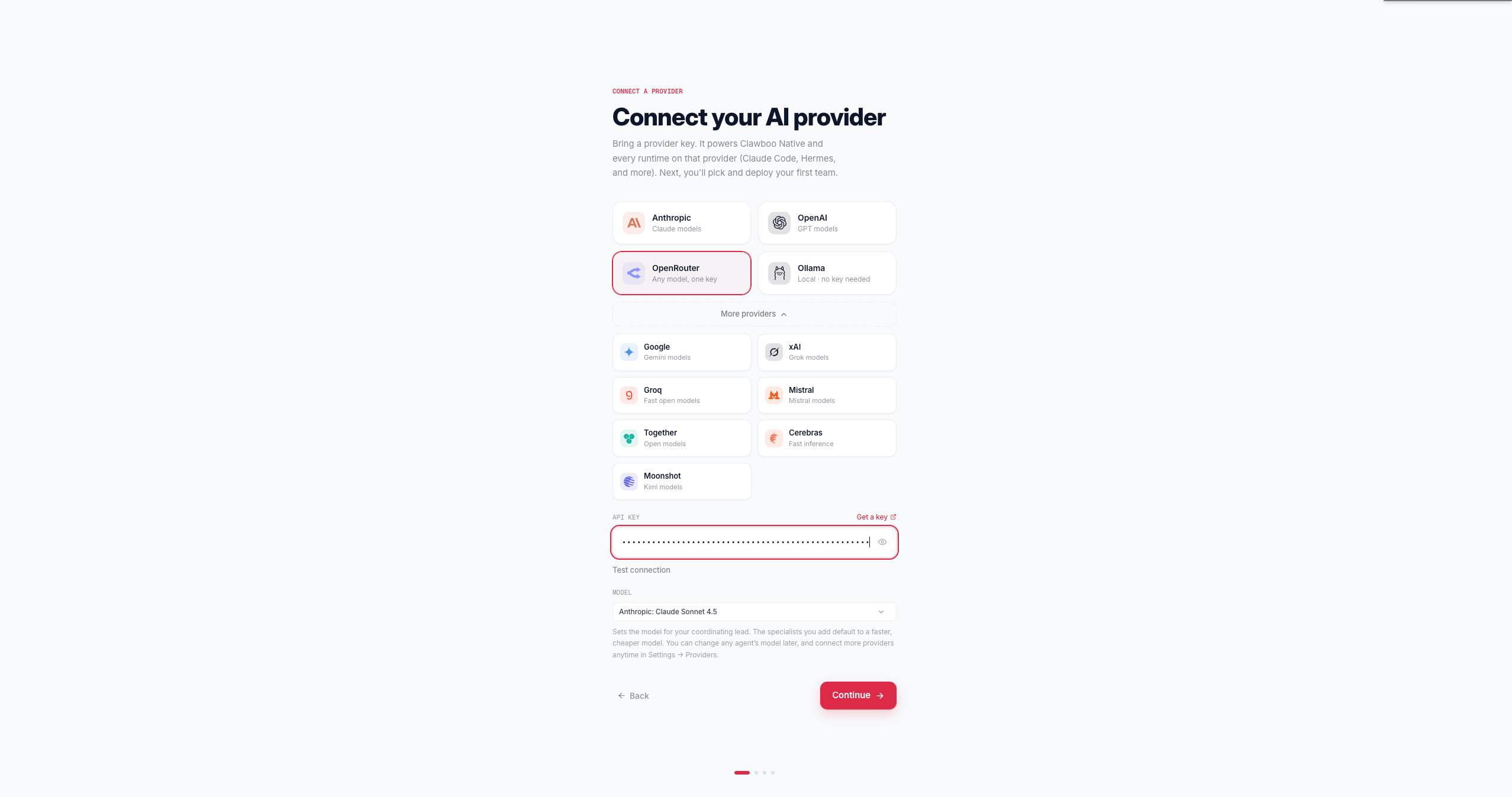
GET against the provider’s models endpoint (Anthropic /v1/models, OpenAI /v1/models, OpenRouter /v1/models, an extra provider’s /models, or the Ollama /api/tags probe) with an 8-second timeout. The key used for this check is never stored, logged, or echoed back.
Expected result: the Continue button is enabled once a key is present (or Ollama is selected). Clicking it shows Verifying…, then:
- The key works → it is stored in Clawboo’s encrypted, at-rest vault (under the env-var slot for the chosen provider, never a plaintext file, never returned in any response; Ollama is keyless, so nothing is stored) and you advance to the optional runtimes step. No team is created yet. If you already ran Test connection on this key and it passed, Continue reuses that result instead of checking twice.
- The key doesn’t verify → nothing is stored and you stay on this step, with the reason inline (“Invalid API key.”, “Could not reach anthropic.”, …) next to the field you can fix. Picking Ollama while it isn’t running shows a start hint (
ollama serve) instead. Continue anyway appears after any failed check and stores the credential unverified — reach for it when the check is failing because this machine can’t reach the provider, not when the key itself is wrong. A genuinely invalid key is better fixed here than discovered in your first chat message.
4. Add more runtimes (optional)
The “Add more runtimes” step is optional. Here you can connect Claude Code, Codex, Hermes, or an OpenClaw Gateway as peers, or set up OpenClaw through an inline “Set up OpenClaw” detour that returns you to this step when it’s done. You can skip it now and add runtimes anytime later from Settings, then the Runtimes panel. Click Continue whenever you’re ready, with or without connecting anything. Expected result: you advance to team selection. Nothing on this step can strand you; you can deploy a team with or without extra runtimes.5. Pick and deploy a team
The Team step opens Clawboo’s team marketplace, the same one you’ll use later from the dashboard. Browse the starter teams, pick one, then customize it: rename it, choose a color collection, and set each agent’s runtime and model. During onboarding every agent defaults to Clawboo Native, so the whole team deploys Gateway-free on the key you just connected. You can still switch any agent to another connected runtime from its picker. Click Deploy. Expected result: Clawboo creates the team and itsclawboo-native agents (sharing Clawboo’s memory), then advances to the “Your team is ready” screen.
6. Open your dashboard
The final wizard screen, “Your team is ready”, shows your deployed team’s roster and a “Led by …” badge naming Boo Zero, the universal leader that coordinates the team (it is teamless, so it never appears in the roster itself). Click Open my dashboard. Expected result: you enter the dashboard in native mode, no Gateway, no GatewayClient, and land in your new team’s group chat, which opens on a one-time “introduce yourself” screen. Write a short intro and click Continue to Team Space: your introduction is saved to the team’s context, so every future message carries it.What you should see
The dashboard opens with your team selected and its group chat in view. The sidebar shows your team with the Boos you deployed. You’re now in a running team that needs no OpenClaw Gateway. The composer is live: type a request and the leader responds, delegating to a teammate when a task needs hands-on work (see Deploy your first team for the full collaboration loop). The team space looks like this: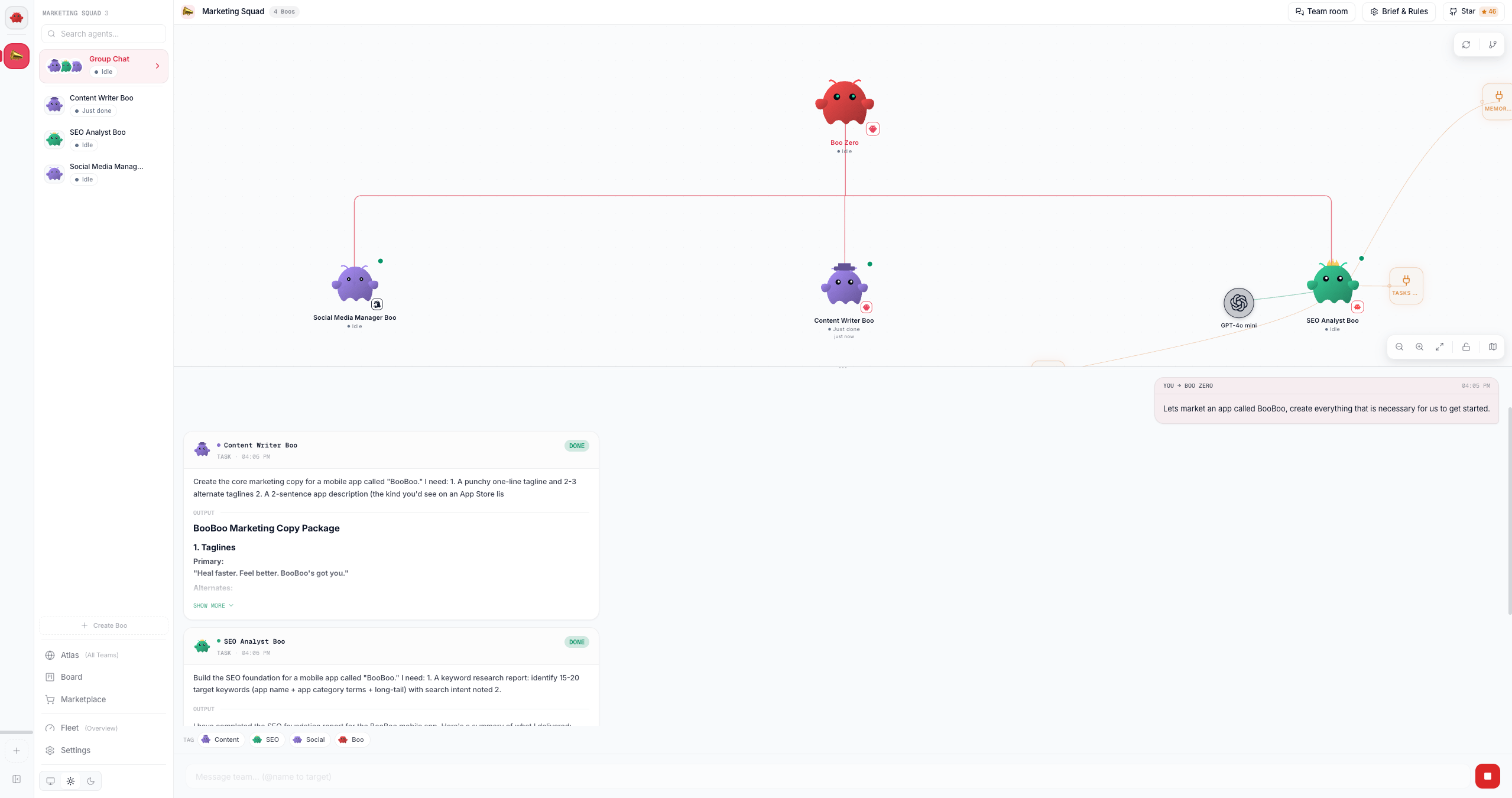
What just happened
Connecting the native runtime linked your provider key toclawboo-native, Clawboo’s in-process harness; deploying a team then wrote its agents into SQLite, the registry of record for which agents and teams exist. There was no OpenClaw Gateway involved at any point. The leader is wired to coordinate work by delegating tasks onto the board (the durable, race-free kanban that is the source of truth for team coordination) rather than doing everything itself, and the team chat runs server-side, so a cascade keeps going even if you close the tab.
Next steps
- Deploy and watch your first team collaborate
- Tour the dashboard: Atlas, Ghost Graph, and the view modes
- The native runtime in depth
- Connect more runtimes (Claude Code, Codex, Hermes)
- Concept: the agent model and the five runtime classes
Enjoying Clawboo? Star it on GitHub
Clawboo is free and open source. A star is the best way to support the project and helps other people find it.