

AgentDetailView), backed by /api/agents/:agentId/files/:name for file I/O and /api/personality for the sliders. This page documents what each panel does, how the four core files map to behavior, and where edits persist.
Prerequisites
Agent file reads and writes go through the connected runtime. The editor and personality sliders are no-ops while the connection is down (
saving never fires; the file PUT returns 503 gateway_disconnected).- A connected runtime (OpenClaw Gateway, or a non-OpenClaw runtime, see Connecting runtimes).
- At least one Boo. If you have none, create one (see Create a Boo).
Open the agent detail view
Three entry points open the detail view (they all callopenAgent(agentId)):
- The agent list: click a Boo in the left column (
AgentListColumn). - The Ghost Graph: right-click a Boo node → Chat, Edit personality, or Edit files. See Ghost Graph.
- The fleet sidebar: click a Boo’s edit affordance.
The panel split sizes persist to
localStorage (the Group has an id), so your layout survives a reload. Drag a ResizeHandle to resize.
Beside the model selector, an Activity button slides in this agent’s live activity feed, the same dock Atlas and a team’s graph carry (see the activity dock).
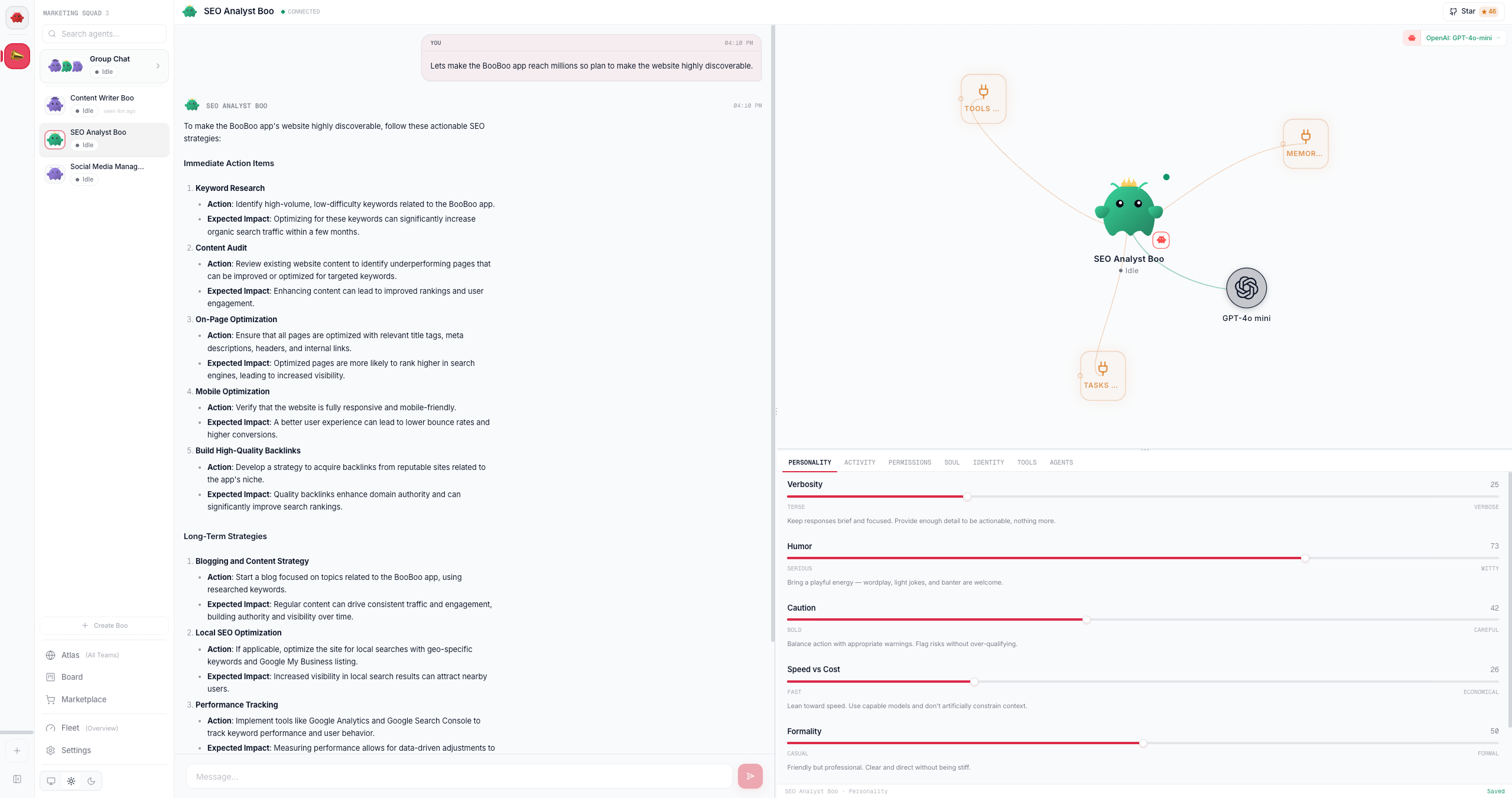
The MiniGraph header fuses the agent’s runtime icon with a model selector for changing this agent’s model. A native (clawboo-native) agent picks from the native model catalog and the change is saved to its AgentConfig via PATCH /api/agents/:agentId/model (no Gateway needed); an OpenClaw agent picks from the OpenClaw catalog and the change is written as a per-agent override in openclaw.json; a Hermes agent picks from the live OpenRouter catalog (stored in execConfig, routed through OpenRouter). Codex and Claude Code run their account/SDK default, so they show a “runtime-managed model” note instead of a picker.
Edit the agent files
The inline editor’s file tabs are a single CodeMirror 6 instance (Markdown highlighting, line wrapping). These seven files are OpenClaw’s agent-file set, and which tabs you see depends on the agent’s runtime. An OpenClaw agent shows the four clawboo creates for it: SOUL, IDENTITY, TOOLS and AGENTS. Aclawboo-native agent shows SOUL and AGENTS; a claude-code, codex or hermes agent shows SOUL and AGENTS. Those drivers read no agent file directly, so clawboo delivers SOUL.md to them itself: it is injected as a persona block at the top of the run’s context, ahead of the team rules and the roster.
USER, HEARTBEAT and MEMORY get no tab by default on any runtime. They belong to OpenClaw’s file set, but clawboo never creates one and never reads one back, so an always-on editor for them would be a control wired to nothing. Any file that already has content stays visible whatever the runtime, so nothing you previously wrote disappears and a file your Gateway wrote is never hidden.
Two name collisions are worth knowing about. hermes keeps its own compounding MEMORY.md in its per-identity home, and clawboo never writes that file: the MEMORY tab here is a different file with different behavior. codex reads an AGENTS.md from the working tree, which is your repo’s file, not this one.
Steps
- Pick a file tab. The active tab gets an accent underline; the CodeMirror document swaps to that file’s content. All seven files are loaded in parallel when the view opens.
- Edit. A modified tab shows an amber dot. The whole editor footer reads Unsaved while any file is dirty.
- Save. Click Save, or press
Cmd/Ctrl+S. The write goes through a per-agent mutation queue (serialized so concurrent writes never race) toPUT /api/agents/:agentId/files/:name, and a toast confirmsSaved <file>. - Saving AGENTS.md also triggers a Ghost Graph refresh, so new routing edges appear without a manual reload. No other file affects the graph.
Tune the personality
The Personality tab has five sliders, each 0–100. Moving a slider does not save; the save fires on pointer-up (the commit). Each slider shows a one-line description that updates live as you drag.Where values persist
A commit writes to two places:- SQLite (
POST /api/personality): the source of truth for the slider values. The handler stores a{ values, customText }JSON wrapper in the agent’spersonality_configcolumn (upserting the agent row if it doesn’t exist yet). SOUL.md(best-effort): the sliders are rendered into Markdown sections and merged intoSOUL.mdbelow a---separator and a “marker. The merge reads the currentSOUL.md, strips any old personality block, preserves the role description above the separator, and writes the result back.
SOUL.md write fails. When the detail view loads SOUL.md, it strips the stale personality block and re-merges the SQLite values, so the editor’s SOUL tab always reflects the current sliders.
Writes through the Gateway’s agent-file API are best-effort and may not persist, so the slider values live in SQLite as the source of truth. Treat the
SOUL.md block as a generated projection of the SQLite source, not the other way around.Custom instructions instead of sliders
Click Use Custom Instructions to switch to a free-text override. The textarea content saves on blur orCmd/Ctrl+S (POST /api/personality with customText), and is merged into SOUL.md under a “ marker; it overrides the slider-generated block. Switch to Sliders clears the custom text and restores the slider personality.
The footer’s Preview SOUL.md toggle shows the merged result (role description plus the active personality block). On clawboo-native that merged text becomes the agent’s system prompt; on OpenClaw the Gateway decides how it is used.
The other editor tabs
The Permissions tab is runtime-gated, and the two runtimes that get it get different controls, because the thing that enforces them is different. An OpenClaw Boo’s Command Execution posture is written to the Gateway, which is what actually gates its commands, and the standing-permission list below it is read from OpenClaw’s own stored policy rather than from clawboo’s records, so it shows what is in force. A native Boo has no Gateway, so it gets the Running commands switch: with that on you are asked before every command and nothing is remembered. The tab is not offered on
claude-code, codex, or hermes, where neither control would be read by anything. A Boo created through clawboo’s screens already carries a posture of its own; see What a new Boo is allowed to run.Start a fresh conversation
Type/reset (or /new) in the chat composer and send. In Clawboo the two words do the same thing. That is a deliberate simplification of OpenClaw underneath, where the reply engine treats them as one trigger (both archive the transcript, keep the session key, and mint a new session id behind it) but the Control UI routes them apart: /reset goes through as a message, while /new calls sessions.create and switches to a brand new agent:<id>:dashboard:<uuid> key.
Your conversation stays on screen. Starting fresh ends what the boo is carrying, not what you can see. Every message stays exactly where it is, in the same chat, and a divider marks the point past which the boo is no longer holding the thread. Scroll up and it is all still there.
What happens:
- the resume pointer is dropped (native) or the command is forwarded to the runtime (OpenClaw), so the next turn starts with no memory of what came before the divider;
- a divider is written into the transcript and kept there, so it is still in place after a reload;
- no message is moved, re-keyed, or deleted.
What the boo still knows
Its character comes back in full. The system prompt is rebuilt from the agent’s own files on every single run, so personality, role and custom instructions are untouched by a reset. Its notes come back too. On the first turn after a reset the boo is handed its own saved memory: up to eight of the most recent facts it recorded, capped so the reminder never crowds out the conversation. That is what keeps a reset feeling like “let’s start this topic fresh” rather than talking to someone with amnesia. The block rides the first turn only, so it never repeats. Two limits worth knowing. Only the boo’s own notes and globally-scoped ones are included; facts belonging to a team room stay in that room. And the notes are delivered as background to consult, explicitly not as instructions to follow, because their content was written by whoever talked to the boo. If nothing was ever saved, nothing is injected and the boo genuinely starts blank. Memory is filled by thememory_save tool, so a boo that never chose to save anything has nothing to recall.
Deleting the agent still deletes its conversation. That is the only thing that removes messages.
Create a Boo
Click Create Boo in the agent list (or the fleet sidebar) to openCreateBooModal.
- Enter a Name (required) and an optional Role (free text that becomes the base
SOUL.md). - Click Create Boo (or press Enter). The modal:
- merges the default personality (all five sliders at 50) into the role text and creates the agent via
POST /api/agents; the server resolves the workspace and writesSOUL.md,IDENTITY.md, andTOOLS.md; - persists the default personality to SQLite (
POST /api/personality); - assigns the new Boo to the currently selected team (best-effort) via
POST /api/teams/:id/agents.
- merges the default personality (all five sliders at 50) into the role text and creates the agent via
Delete a Boo
Hover a Boo in the agent list and click the trash icon.deleteAgentOperation:
- archives the agent via
DELETE /api/agents/:agentId; the server deletes it upstream (the Gateway) and removes the SQLite row plus its FK-referenced cost/approval rows. If the connection is down, the server falls back to a SQLite-only cleanup and returns{ ok: true, upstreamDeleted: false }; - removes it from the in-memory fleet store;
- re-identifies Boo Zero from the remaining agents (in case the deleted Boo was the leader);
- clears its transcript and deletes its chat history.
Deletion is not reversible. The agent’s files and config are removed from both the runtime and SQLite. There is no undo.
Verify it worked
- File save: re-open the file tab (or reload the view) and confirm the saved content is loaded back from
GET /api/agents/:agentId/files/:name. The footer reads Saved. - Personality: reload the detail view; the sliders should restore their saved positions (read from
GET /api/personality?agentId=...), and Preview SOUL.md should show the matching personality block. - Create / delete: the agent appears in (or disappears from) the agent list. After a create,
GET /api/agentsincludes the new record.
Troubleshooting
An invalid file name returns 400. The file routes validate
:name against the seven known agent files (AGENTS.md, SOUL.md, IDENTITY.md, USER.md, TOOLS.md, HEARTBEAT.md, MEMORY.md). Any other name is rejected with { error: "invalid file name" }.See also
- Ghost Graph, the per-agent mini-graph and the team-wide canvas
- Group chat, work with a whole team at once
- Boo Zero, the universal team leader’s Brief and rules
/api/agentsreference, full request/response shapes for the registry, files, and sessions- Glossary, Boo, Boo Zero, AgentSource, registry of record