

ViewMode: selecting a team opens its group chat, clicking an agent opens its detail view, and the sidebar’s nav buttons and the Settings modal switch the main area to one of fifteen full-screen nav panels (NAV_VIEWS in stores/view.ts, each mapped to a lazily-loaded feature component by NavPanel in features/layout/navPanels.tsx, which also wraps each panel in its own error boundary). A few surfaces, Teams, Group chat, Agents, Boo Zero, and Theming, are reached through the sidebar, agent rows, the group-chat row, or the theme toggle rather than a nav button. This page is mostly navigation; each linked how-to grounds itself in its own feature module and backing API route(s).
Team-scoped surfaces
These live in the left two columns and follow the currently selected team. The team-icon strip (TeamSidebar) and the agent/group-chat column (AgentListColumn) drive them.
- Teams: Create and manage teams, set the team leader, capture per-team rules, and pick a color collection. Reached from the team-icon strip’s + Create team button and right-click context menu.
- Group chat: The team’s collaboration room, opened by clicking a team icon or the Group Chat row in the agent column. Gated once per team by the “Know Your Team” onboarding flow before the composer unlocks.
- Ghost Graph & Atlas: The team’s agent topology (embedded in group chat) and the global all-teams Atlas view (the
graphnav slot, labeled Atlas (All Teams)). Halos, team badges, peacock expand/collapse, the Boo port and the + button for building on the canvas, and the activity dock live here. - Agents: Click any agent row to open its detail view: chat, the SOUL / IDENTITY / TOOLS / AGENTS file editors, and the personality sliders.
- Boo Zero: The universal team leader. Its standalone view (opened from the mascot icon) hosts the display name and global brief; per-team briefs and rules live behind the gear in the group-chat header.
Org-wide nav panels
These open from the nav buttons at the bottom ofAgentListColumn or from the Settings modal (Cmd/Ctrl+,); Where things live says which. Each switches the main content area to a full-screen panel; all are always available (no feature gates).
- Board: The durable kanban board, fused with chat. Columns by task status; cards carry runtime, verification, and cost badges.
- Marketplace: Browse and deploy the 436 first-class agents and 85 workflow teams across a Skills / Agents / Teams tab strip.
- Connectors: Connect MCP servers and apps for your agents to use, and see the grants that govern their tools.
- Cost & budgets: The Tokens Used dashboard: per-agent and per-team token usage and trends, plus USD budgets via the Governance surface.
- Routines: Recurring work for a team or one agent, plus the OpenClaw Gateway’s own cron jobs.
- Memory: Search, save, and browse the shared Memory-MCP tier (facts and procedures).
- Capabilities: The unified capability inventory across all runtimes, grouped by runtime and kind, with manageability-derived actions.
- Observability: Traces, the error taxonomy, fleet health, the delegation-graph projection, and the eval scorecard.
- Governance: Budgets, caps, the audit log, and the shared tool-approval queue.
- System: Gateway control, default model, API keys, agent coordination, and system info.
- System health: The boot-probe checklist and resolved runtime state, the one liveness surface that answers with the Gateway down.
App-wide
- Approvals: The pending-approval queue (Gateway exec approvals, native
run_commandrequests, and the brokered tool-approval queue). Not a nav panel: it renders in the Board’s Needs you column and as an inline tray above the group-chat composer. - Theming: The light/dark/system theme toggle in the bottom-left of the sidebar (
ThemeToggle); fresh installs default to light.
Where things live (nav slots)
The fifteen nav panels map one-to-one toNavView ids. The table is the same wiring ContentArea uses, so it doubles as a reference for the navigateTo(view) action. Six panels live in the sidebar, and four of them have a number shortcut: Cmd/Ctrl+1–4 is Atlas, Fleet, Marketplace, Board. The Settings modal (Cmd/Ctrl+,) holds the other nine, plus Memory, which is in both places on purpose: the sidebar opens it full-screen with its graph, and Settings shows the list.
The
fleet panel (a read-only overview) does not have its own how-to; it is covered in the dashboard tour.Approvals is not a nav slot. It has a how-to page (Approvals) but no NavView id: approvals render in the board’s Needs you column and in an inline tray above the group-chat composer.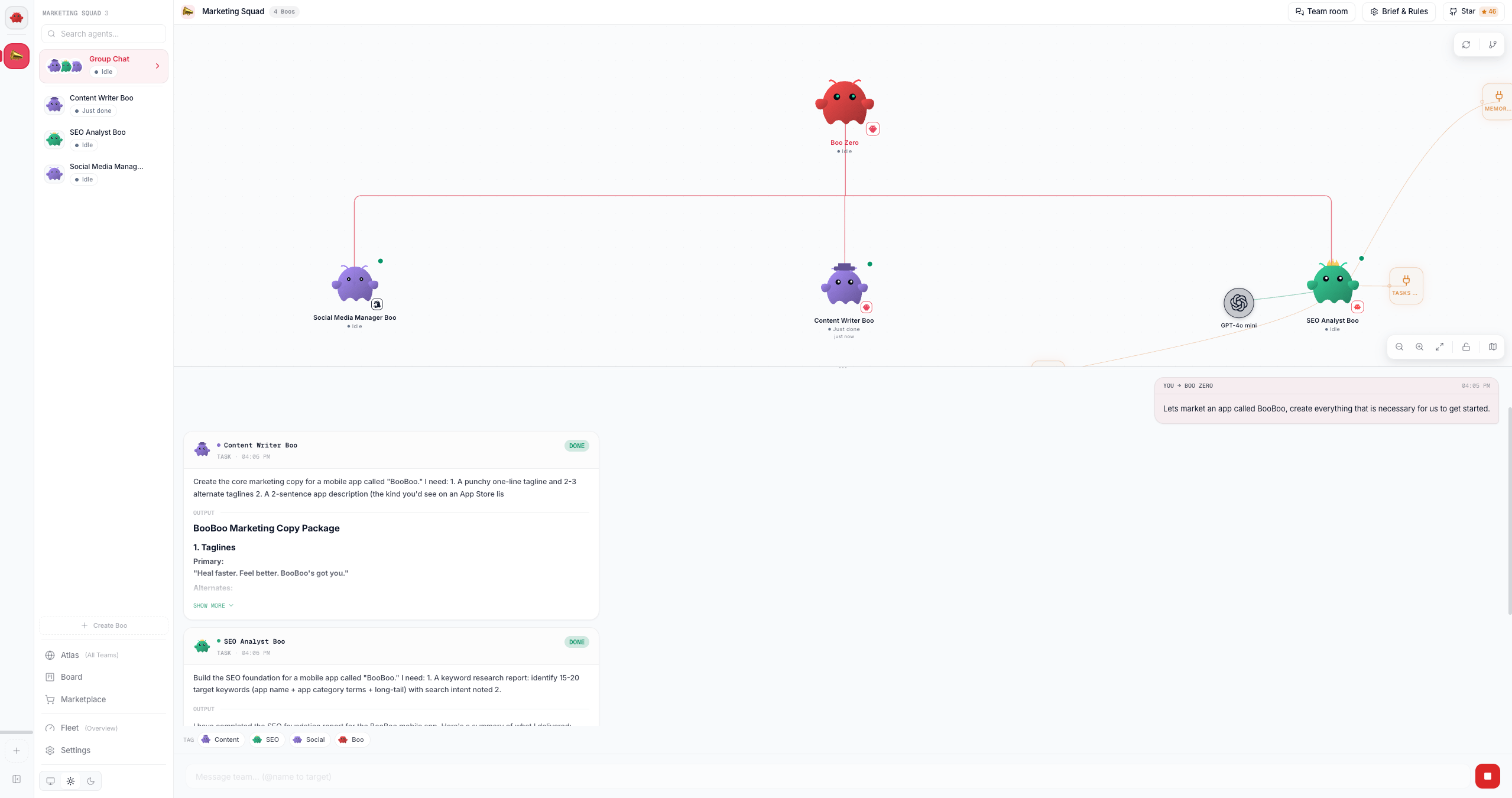
See also
- Dashboard tour: Atlas, the sidebar, and the view modes, end to end
- First team: deploy a team and watch it collaborate
- Concepts: the models behind these features (the board, peer chat, verification, governance)
- Runtimes overview: the five runtime classes and the capability matrix
- REST API reference: every backing route