

- A provider is the service whose model answers: Anthropic, OpenAI, OpenRouter, Google and others, or Ollama running models on your own computer. You connect one with an API key, a ChatGPT sign-in, or (for Ollama) nothing at all.
- A runtime is the engine an agent runs on. Clawboo Native is built in; OpenClaw, Claude Code, Codex and Hermes are separate programs that Clawboo installs and connects. Each agent runs on one runtime, and the runtime uses the providers you connect. Choose a runtime compares them.
Where to connect what
Open Settings from the bottom of the left sidebar, or press Cmd+, (macOS) or Ctrl+, (Windows, Linux) while no text field has focus. Providers and Runtimes are the first two items under Workspace.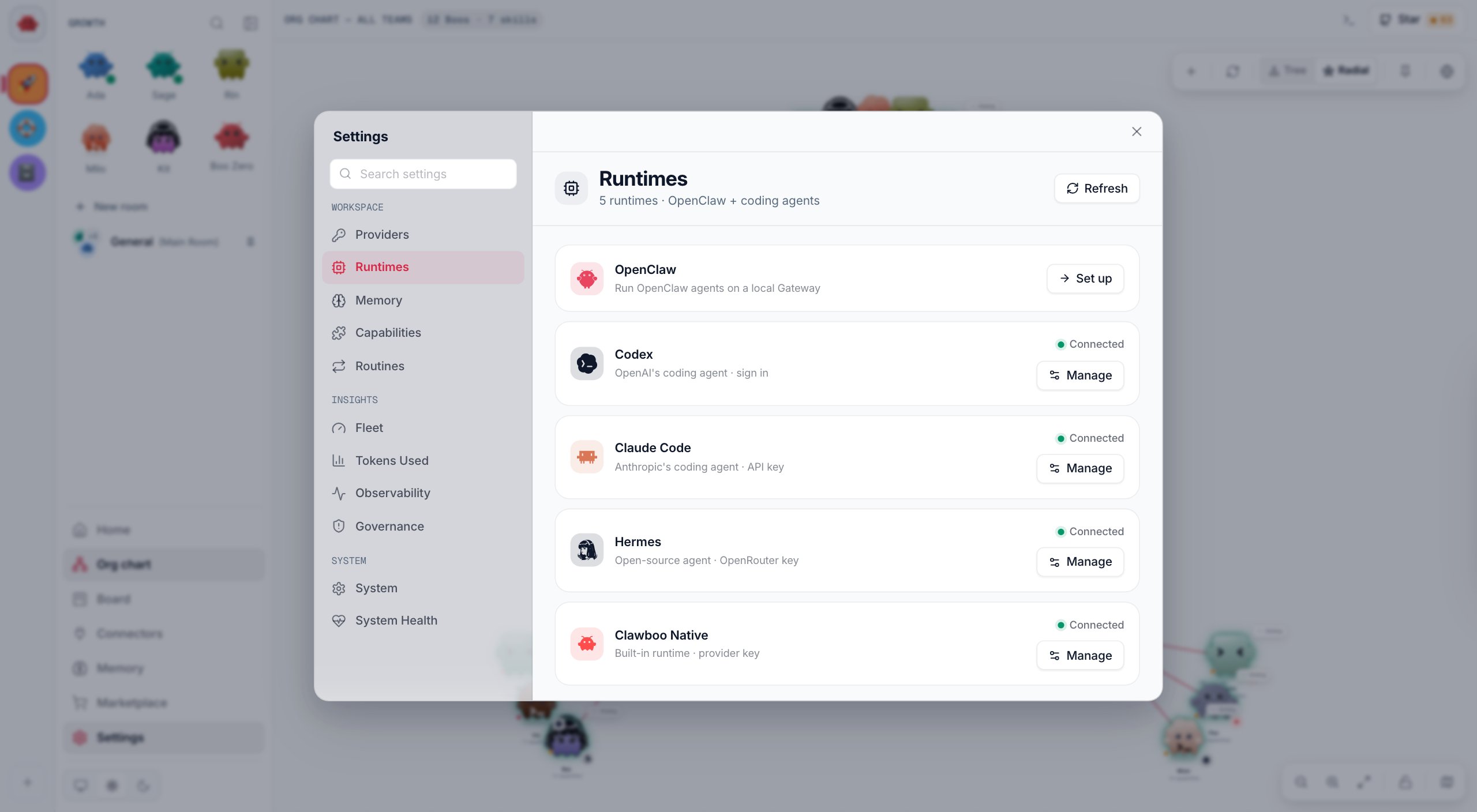
Connect an API key
1
Open the provider's row
Open Settings > Providers. OpenAI, OpenRouter, Anthropic, Google, xAI, Groq and Mistral are listed first; click More providers (7) for Moonshot, MiniMax, Together, NVIDIA, Hugging Face, Cerebras and Venice.
2
Paste your key
Click Connect on the row. If you don’t have a key yet, most rows show a Get a key link to the provider’s console. Paste the key into the field.
3
Save it
Click Save. Clawboo checks the key with the provider before it saves it. If the check fails, the row shows the reason: fix the key, or click Save anyway when the provider is only unreachable from this computer. MiniMax, NVIDIA, Hugging Face and Venice keys save without a check.You should see the row read Connected. To replace the key later, click Update.
A key you save on the Providers page is also copied, in plain text, into OpenClaw’s files so an OpenClaw Gateway can use it. See Where keys are stored.
Run agents on your ChatGPT plan
Your ChatGPT plan works through Codex, OpenAI’s coding agent, which signs in with your ChatGPT account instead of a key.1
Install Codex
Open Settings > Runtimes. On the Codex row, click Install, then Install in the panel that opens.
2
Sign in with ChatGPT
Open Settings > Providers. On the ChatGPT subscription row, click Connect, then Sign in with ChatGPT. Codex’s own sign-in opens OpenAI’s page in your browser; approve there. Clawboo never sees your password.You should see the row read Connected, with “Managed by the Codex CLI”. The Codex row under Runtimes reads Connected too.
3
Put agents on Codex
When you create a team, choose Codex as a member’s runtime in Customize team. Onboarding’s Sign in with ChatGPT path does this for your first team.
Run agents on a local Ollama
Ollama runs open models on your own computer, with no key and no per-token bill. Clawboo Native can use it.1
Pull a chat model
Install Ollama, start it (
ollama serve), and pull a chat model that can use tools:2
Turn Ollama on
Open Settings > Runtimes and click Manage on Clawboo Native (or Connect, if it has no provider yet). On the line Ollama (“Local · no key needed”), click Use. Clawboo checks that Ollama answers first; if it is not running yet, start it or click Use anyway.
3
Make it the default
Click the Ollama row to open it. Click Make default if Ollama is not your default yet, then pick the Default model from the models your Ollama has pulled.You should see the Ollama row read Connected, with a Default badge.
http://localhost:11434/v1, or at OLLAMA_BASE_URL when you set one. Models that can’t use tools are marked (can't use tools), and embedding models are left out. Ollama runs cost you nothing, so Clawboo records them at $0 and their tasks read free on the Board. Ollama’s cloud models (a -cloud tag) run on ollama.com and are estimated like other models without a price. Clawboo Native has the details.
Choose the default provider and model
The default decides what new Clawboo Native agents run on when you leave their model on Default.1
Open the provider list
Open Settings > Runtimes and click Manage on Clawboo Native. Under LLM providers you see each connected provider; the current default has a Default badge.
2
Make a provider the default
Click a provider’s row to open it, then click Make default.
3
Pick its model
Choose the Default model. The choice saves at once, and “Saved” appears next to the label.
- A Clawboo Native Boo Zero switches to the new default right away.
- Agents you deploy later with their model on Default use it. A team’s leader runs the default model; other members run that provider’s faster, cheaper model. On Ollama, every agent runs the default model.
- Agents you already deployed keep their models.
- If the default provider stops being set up, new agents fall back to the first provider that is: Anthropic, OpenAI, OpenRouter, Ollama, then the others.
Add Claude Code, Codex or Hermes
Each of these is a separate program. Clawboo installs it for you from Settings > Runtimes; click Install on its row, then Install in the panel that opens. Then connect it:- Claude Code
- Codex
- Hermes
Needs an Anthropic API key. On an npm install of Clawboo, also install the Claude Agent SDK first:
npm install -g clawboo @anthropic-ai/claude-agent-sdk. Click Connect on the row and paste the key, or save it under Providers. See Claude Code.Set up OpenClaw
OpenClaw runs its own Gateway on your computer. On the OpenClaw row, click Set up, then Set up OpenClaw. Clawboo installs OpenClaw if it is missing and configures it with a credential you already connected (a key, a ChatGPT sign-in or your local Ollama), or asks you for a key. Then it starts the Gateway and connects. When the Gateway is offline, the row offers Reconnect instead. Manage on a connected OpenClaw holds its Gateway controls and default model, and its Disconnect stops the local Gateway. See OpenClaw for the full setup, including device approval.Disconnect a key or a runtime
Removing a key and disconnecting a runtime are different actions:
After a runtime’s Disconnect:
- That runtime ignores keys in your shell environment and in
~/.openclaw/.envuntil you connect it again, so it reads Needs key even if a copy is still there. - Other runtimes still find a key in your shell environment or in
~/.openclaw/.env, where keys saved on the Providers page also live. A runtime’s Disconnect never deletes those copies. - To reconnect Clawboo Native without pasting a key again, click Connect on its row, then Use on a provider whose key is still saved.
Where keys are stored
- Clawboo’s encrypted vault. Every key you connect is saved in
~/.clawboo/secrets/runtime-keys.json(in the folderCLAWBOO_HOMEnames, if you set it), encrypted with AES-256-GCM. The master key sits next to it insecrets/master.key, readable only by your user. The encryption protects the key file when it is copied on its own, in a backup or a sync folder. It does not protect against a program running as your user, which can read the master key too. - Plain-text copies for OpenClaw. A key you save on the Providers page is also written, unencrypted, to
~/.openclaw/.envand to every existing OpenClaw agent’sauth-profiles.json, because the OpenClaw Gateway reads keys from there. Clawboo writes those files readable only by your user account, and creates~/.openclawfor this even if you never installed OpenClaw. Set up OpenClaw copies the key it reuses there too. Disconnect on the Providers page removes these copies. - Vault only. A key you paste on a runtime’s row under Runtimes, or during onboarding, stays only in the vault until Set up OpenClaw reuses it.
- ChatGPT sign-ins stay with each tool. Codex keeps its sign-in in
~/.codex/auth.json, Hermes in~/.hermes/auth.json, and OpenClaw in its own files. Clawboo copies the Codex and Hermes sign-ins into each agent’s own folder for its runs. - Keys from your environment. Clawboo also uses a key exported in the shell you start Clawboo from, such as
ANTHROPIC_API_KEY. Such a key makes runtimes read Connected, but the Providers page does not list it.
~/.clawboo removes the vault but not the plain-text copies, and Clawboo still reads keys from ~/.openclaw/.env afterwards. To remove keys for good, disconnect them on the Providers page first. See Data and state for every file Clawboo writes.
Under the hood
Under the hood
- For each runtime, Clawboo looks for a key in this order: the server’s environment, the vault, then
~/.openclaw/.env. A runtime you disconnected reads the vault only until you connect it again; Clawboo records that insecrets/disconnected-runtimes.json. The Ollama choice is recorded insecrets/keyless-providers.json. Neither file holds a secret. CLAWBOO_SECRETS_MASTER_KEYsupplies the master key from outside the folder. Move your existing key into it rather than generating a new one, or saved keys stop decrypting. See Environment variables.- Clawboo never logs a key, returns one from its API, or writes one to its database.
- The routes behind these screens are
GET /api/providers,POST /api/providers/:id/connectand/disconnect, andPOST /api/runtimes/:id/connect,/disconnectand/logout. See the Runtimes API.
Check that it worked
- Settings > Providers: the provider’s row reads Connected.
- Settings > Runtimes: the runtime’s row reads Connected. Manage > Re-check asks again, and Details opens its health checks.
- When you create a team, the runtime can be picked for a member in Customize team.
- In team chat, type
@, pick an agent on that runtime, and ask it something short. You should see a reply; if the run fails, the chat says “The run failed:” and why.
Troubleshooting
Invalid API key.
Invalid API key.
The provider rejected the key. Copy it again from the provider’s console, or create a new one, and save it again.
Could not reach openai (timed out).
Could not reach openai (timed out).
The key check could not reach the provider from this computer within 8 seconds (the message names the provider). Check your network, proxy or firewall. If you are sure the key is right, click Save anyway (or Connect anyway on a runtime’s row) to store it without the check.
Provider returned 429.
Provider returned 429.
The provider answered the key check with an error other than a rejected key (the number varies). A 429 means the provider is limiting requests; a number from 500 up means a problem on the provider’s side. Wait a moment, check your account with the provider, then try again.
Clawboo Native has no provider key connected.
Clawboo Native has no provider key connected.
The agent’s provider has no key that Clawboo Native can read. Save that provider’s key on Settings > Providers. If you disconnected Clawboo Native earlier, click Connect on its row and Use a saved key.
My team stopped working after I disconnected another runtime
My team stopped working after I disconnected another runtime
A runtime’s Disconnect deleted a key that your team’s runtime also used. Save the key again on Settings > Providers. See Disconnect a key or a runtime.
A runtime still reads Connected after I removed its key
A runtime still reads Connected after I removed its key
It found another credential: a key exported in your shell, another key it can use (Hermes also runs on Anthropic and OpenAI keys), or, for Hermes, a ChatGPT sign-in. To stop a runtime from using shell or OpenClaw copies, use its own Disconnect under Runtimes.
Ollama isn't answering on this machine. Start it (ollama serve) and try again.
Ollama isn't answering on this machine. Start it (ollama serve) and try again.
Clawboo could not reach Ollama at
http://localhost:11434 (or your OLLAMA_BASE_URL). Start Ollama, then click Use again. Use anyway turns it on without the check.Ollama doesn't have llama3.2 yet, so this run couldn't start.
Ollama doesn't have llama3.2 yet, so this run couldn't start.
The agent’s model is not pulled (the message names the model). Run the
ollama pull command the message gives, or pick a model you have pulled in the agent’s settings. Check again on the Ollama row refreshes the list.The codex CLI isn't installed yet. Install it first, then sign in.
The codex CLI isn't installed yet. Install it first, then sign in.
Sign in with ChatGPT needs Codex installed. Install it from Settings > Runtimes > Codex, then sign in again.
Next steps
- Choose a runtime: what each runtime is good at, and what it can do.
- Clawboo Native: the built-in runtime, its default models and local Ollama.
- Teams: create a team and pick each member’s runtime.
- Budgets and spend: how each runtime’s cost reaches your budgets.
- Data and state: every file Clawboo keeps on your computer.