

Open the panel
Open Settings (the gear in the sidebar, or Cmd/Ctrl + ,) and choose Capabilities under Workspace. The header counts what it found (N capabilities · M runtimes) and has a Refresh button. Approval cards waiting on you also appear at the top of the panel; see Approvals.
You can also start from a runtime: on the Runtimes page, open a runtime’s diagnostics (the i button on its card) and press View capabilities. The panel opens showing only that runtime.
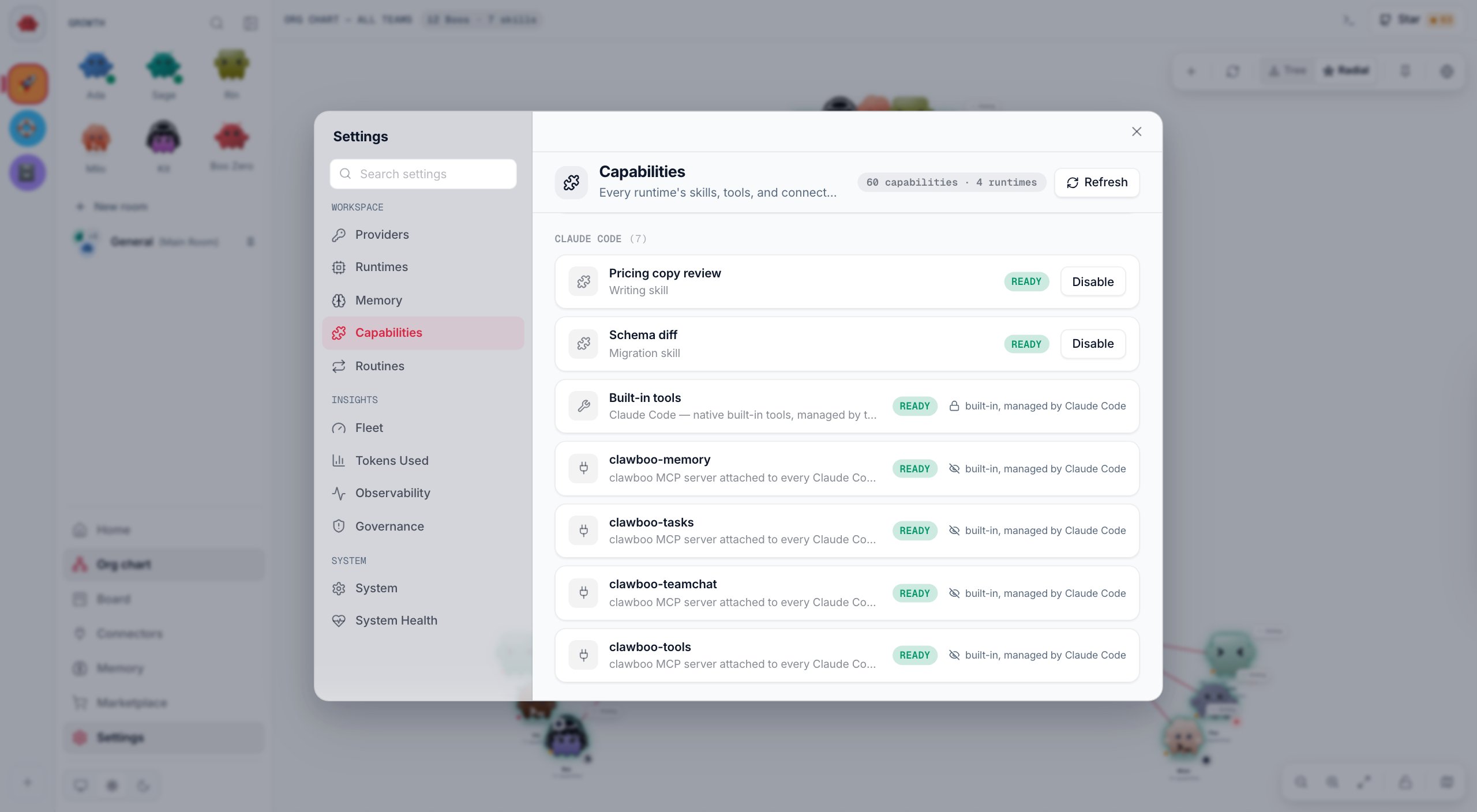
Read the list
Rows are grouped by runtime, in this order: Clawboo Native, OpenClaw, Claude Code, Codex, Hermes. When more than one runtime has rows, pills above the list (All runtimes, then one per runtime) narrow it to one group. Each row’s icon shows its kind: a puzzle piece for a skill, a wrench for a tool, a plug for a connector.
A row with no button reads built-in, managed by and the runtime’s name: Clawboo can read it but not change it.
What each runtime lists
Skills you add to an agent are listed in the group of that agent’s runtime. The panel does not say which agent a per-agent row belongs to; to see or change one agent’s skills and connectors, open its ring on the Org chart or its page.
About Clawboo's built-in tools
About Clawboo's built-in tools
The Clawboo Native group lists four built-in tools:
echo, note, web_search and delete_path. They are simple tools that exercise Clawboo’s approval checks. web_search reads Unavailable unless a Tavily key (TAVILY_API_KEY) is set, and neither it nor delete_path searches the web or deletes anything. For real web access, give an agent a browser or a search connector; see Connectors.Switch a capability on or off
1
Find the row
Use a runtime pill, or scroll to the group.
2
Press Disable or Enable
The row shows a spinner while Clawboo makes the change.
3
Check the pill
The panel reloads, and the pill flips between Ready and Disabled. If Clawboo cannot make the change, a message starting Could not disable (or Could not enable) says why, and nothing changes.
Skills
A skill in Clawboo is a label for something an agent is good at, chosen from the Marketplace’s built-in list. You add one from the Skills tab of the Marketplace, or on the graph: pull a thread off a Boo, or press +, and pick from Skills. Adding a skill records it on the agent: it appears in this panel and as a tile on the agent’s ring. It does not give the agent a new tool or change its instructions. Tools come from connectors and from the runtime itself. Hermes is the exception in this list: the skills under the Hermes group are skill files a Hermes agent wrote for itself, which Hermes reads. Clawboo shows them and never changes them.Under the hood
Under the hood
Every row has a manageability tier that decides whether Clawboo may change it:
The panel reads
GET /api/capabilities and switches rows with POST /api/capabilities/enable or /disable, which refuse a row its tier forbids with 422. When a runtime cannot be read, the server serves the rows it last read for it. The model behind the tiers is in Capabilities, and the request shapes are in the capabilities API reference.Troubleshooting
Codex rows read Pending auth and Enable is greyed out
Codex rows read Pending auth and Enable is greyed out
Clawboo lists Codex’s servers so you can see them, but it makes no changes to Codex. The button’s hint suggests running
codex login; signing in does not change these rows.Switching a Gateway tool fails with gateway_disconnected
Switching a Gateway tool fails with gateway_disconnected
Gateway tools are changed through the OpenClaw Gateway, so it must be connected. The panel keeps showing the rows it last read while the Gateway is down. Reconnect it, then try again.
The panel says it could not load the capability inventory
The panel says it could not load the capability inventory
The panel could not reach the Clawboo server. Press Retry. This is different from No capabilities found, which means the server answered with an empty list.
Next steps
- Connectors: connect tools and give them to agents.
- Marketplace: add skills, agents and teams.
- Approvals: answer the cards at the top of this panel.
- Capabilities: the model behind the inventory and its tiers.
- Capabilities API: read and switch rows from scripts.