> ## Documentation Index
> Fetch the complete documentation index at: https://docs.claw.boo/llms.txt
> Use this file to discover all available pages before exploring further.
# Capabilities dashboard
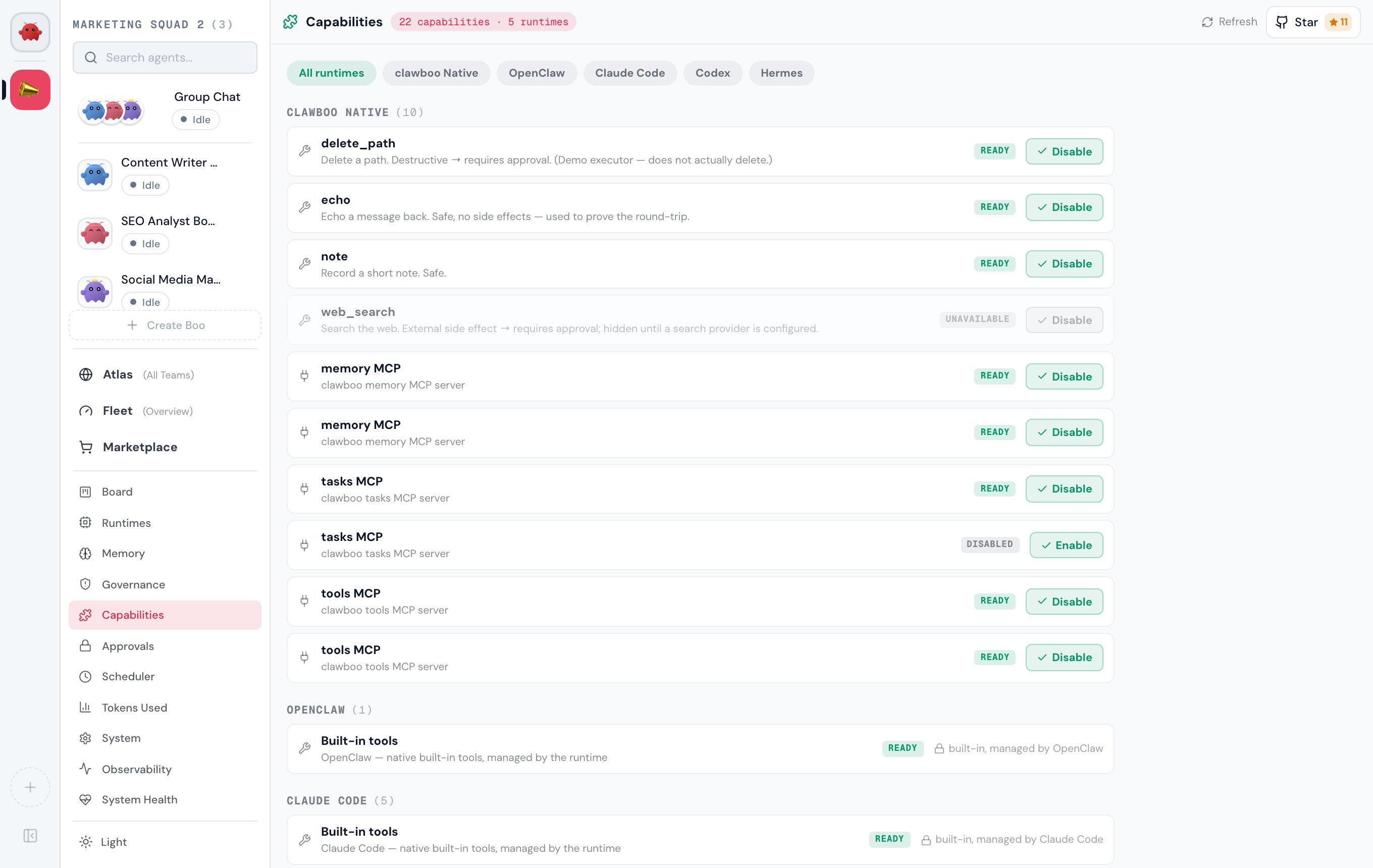
> Use the Capabilities dashboard to browse the unified capability inventory and enable or disable the rows your runtimes let you manage.
Use this page when you want to see every skill, tool, and connector across all your [runtimes](/appendices/glossary) in one place, understand why a tool is greyed out, and turn the manageable ones on or off.
The dashboard is the human-facing surface over the unified **capability inventory**, the same merged stream the Ghost Graph reads. It groups every runtime's capabilities by runtime, then by kind, and renders a per-row action set that is a pure function of the row's manageability tier: the UI can never offer an action the owning runtime forbids. The panel is `CapabilitiesPanel`, backed by `GET /api/capabilities` and `POST /api/capabilities/:action`.
 ## Prerequisites
The Capabilities panel is always available; the inventory subsystem is always on. What it shows depends on which runtimes you have connected and what skills you have installed.
* At least one runtime to read capabilities from. `clawboo-native` is built in and always contributes rows; connecting `openclaw`, `claude-code`, `codex`, or `hermes` adds their capabilities. See [Connecting runtimes](/runtimes/connecting-runtimes).
* Nothing else: reads are non-destructive, and a disconnected source degrades to its last-known rows rather than blanking the inventory.
## Where it lives
Open **Settings** (the gear at the bottom of the sidebar, or `Cmd/Ctrl + ,`), then **Capabilities** under the Workspace group (the puzzle-piece icon). There is no Cmd/Ctrl number shortcut for this view.
The header shows a live count pill (`N capabilities · M runtimes`) and a **Refresh** button. The diagnostics drawer elsewhere in the app can also deep-link here with a runtime pre-selected.
## How to read the inventory
### Groups: runtime → kind
Rows are grouped by the runtime that **owns** the capability, in a fixed order (`clawboo-native`, then `openclaw`, `claude-code`, `codex`, `hermes`, `human`). Each group header shows the runtime label and a count. Within a group, rows sort by kind, then alphabetically by name.
There are three kinds, each with its own icon:
| Kind | What it is | Icon |
| ----------- | ------------------------------------------- | ------------ |
| `skill` | A curated skill annotated onto an agent | puzzle piece |
| `tool` | A brokered MCP tool or a runtime built-in | wrench |
| `connector` | An attached MCP server / external connector | plug |
When more than one runtime contributes capabilities, a row of filter pills appears above the groups: **All runtimes** plus one pill per runtime. Click a pill to narrow the view to a single runtime.
### Availability badges
Every row carries a `StatusPill` derived from the record's availability and status:
| Pill | Tone | Meaning |
| -------------- | ------- | ------------------------------------------------------------------------------------- |
| `Ready` | success | Available and on |
| `Disabled` | idle | Available but currently off |
| `Pending auth` | warning | Real and manageable, but blocked on auth (e.g. a Codex connector until `codex login`) |
| `Unavailable` | idle | Its availability requirement is unmet (greyed) |
An **unavailable** row is rendered greyed (reduced opacity plus a grayscale filter) because its declarative availability requirement, an auth credential, a config value, an env var, or a plugin, is not satisfied. The server evaluates availability into `available` plus a `diagnostics` list; an unavailable row never offers an Enable/Disable button, so the action set reads consistently with the greyed presentation.
### Manageability-derived actions
The action on the right of each row is a pure function of the row's **manageability tier**, never a per-runtime literal in the UI:
| Manageability | Who owns the store | Dashboard action |
| ------------------- | -------------------------------------------------------------------------------------------- | ------------------------------------------------------------------ |
| `managed` | Clawboo owns the durable row (brokered tools, curated skills) | **Enable** / **Disable** by current status |
| `external-write` | The runtime owns the store; Clawboo writes through it (e.g. Hermes `mcp.json` / `SKILL.md`) | **Enable** / **Disable** by current status |
| `runtime-of-record` | The runtime owns it; Clawboo drives changes through the runtime's API (e.g. OpenClaw config) | **Enable** / **Disable**, only if the source can actually write it |
| `observe-only` | Clawboo can read but never write (built-ins, external-vendor CLIs) | none: `built-in, managed by ` |
A few rows look manageable by tier but still render no button, by design:
* An **observe-only** row shows `built-in, managed by ` with a lock or eye-off icon and no action.
* An **unavailable** (greyed) row offers no action even if its tier is managed; its requirement is unmet.
* A `runtime-of-record` row whose owning source can't yet write it (the source sets `writable: false`, e.g. an OpenClaw connector or plugin whose `config.patch` write is a follow-up) renders no dead button.
* A `manageable-but-pending-auth` row renders a **disabled** Enable button carrying the source's hint; for a Codex connector the hint is `pending auth — run \`codex login\`\`.
The dashboard's per-row action set is intentionally Enable/Disable only. Installing a skill lives in the [Marketplace](/using/marketplace), and approving a tool call flows through the tool-approval queue embedded at the top of this panel (see [Approvals](/using/approvals)). The full managed action set is satisfied across those surfaces, not duplicated here.
## Steps
### Enable or disable a capability
1. Open **Capabilities** from the sidebar.
2. Find the row. Use a runtime filter pill or scroll to its group.
3. Confirm the action is offered: the row has an **Enable** (mint) or **Disable** (neutral) button. If it shows `built-in, managed by `, it is observe-only and cannot be changed here.
4. Click the button. The row goes busy (a spinner replaces the action icon) while `POST /api/capabilities/enable` (or `/disable`) runs with `{ id }`.
5. On success the panel refreshes and re-reads the inventory, so the pill flips (`Disabled` ↔ `Ready`).
If the action is rejected, for example a `422` because the row is observe-only or not writable, a toast surfaces the typed error, and the inventory is **not** refreshed because nothing changed.
### Refresh / handle a degraded source
* Click **Refresh** in the header to re-read every source.
* If a source is degraded (a disconnected Gateway, a missing runtime home), a warning banner names the source and its reason, and the dashboard shows that source's **last-known** capabilities rather than dropping them. Reconnect the source, then Refresh.
## How it's wired
```mermaid theme={"theme":{"light":"github-dark","dark":"github-dark"}}
flowchart LR
Panel["CapabilitiesPanel"] -->|GET /api/capabilities| Service["loadCapabilities()"]
Service --> Mux["CapabilityMultiplexer.read()"]
Mux --> Native["native"]
Mux --> OC["openclaw"]
Mux --> CC["claude-code"]
Mux --> Codex["codex"]
Mux --> Hermes["hermes"]
Service -->|persist OK sources
## Prerequisites
The Capabilities panel is always available; the inventory subsystem is always on. What it shows depends on which runtimes you have connected and what skills you have installed.
* At least one runtime to read capabilities from. `clawboo-native` is built in and always contributes rows; connecting `openclaw`, `claude-code`, `codex`, or `hermes` adds their capabilities. See [Connecting runtimes](/runtimes/connecting-runtimes).
* Nothing else: reads are non-destructive, and a disconnected source degrades to its last-known rows rather than blanking the inventory.
## Where it lives
Open **Settings** (the gear at the bottom of the sidebar, or `Cmd/Ctrl + ,`), then **Capabilities** under the Workspace group (the puzzle-piece icon). There is no Cmd/Ctrl number shortcut for this view.
The header shows a live count pill (`N capabilities · M runtimes`) and a **Refresh** button. The diagnostics drawer elsewhere in the app can also deep-link here with a runtime pre-selected.
## How to read the inventory
### Groups: runtime → kind
Rows are grouped by the runtime that **owns** the capability, in a fixed order (`clawboo-native`, then `openclaw`, `claude-code`, `codex`, `hermes`, `human`). Each group header shows the runtime label and a count. Within a group, rows sort by kind, then alphabetically by name.
There are three kinds, each with its own icon:
| Kind | What it is | Icon |
| ----------- | ------------------------------------------- | ------------ |
| `skill` | A curated skill annotated onto an agent | puzzle piece |
| `tool` | A brokered MCP tool or a runtime built-in | wrench |
| `connector` | An attached MCP server / external connector | plug |
When more than one runtime contributes capabilities, a row of filter pills appears above the groups: **All runtimes** plus one pill per runtime. Click a pill to narrow the view to a single runtime.
### Availability badges
Every row carries a `StatusPill` derived from the record's availability and status:
| Pill | Tone | Meaning |
| -------------- | ------- | ------------------------------------------------------------------------------------- |
| `Ready` | success | Available and on |
| `Disabled` | idle | Available but currently off |
| `Pending auth` | warning | Real and manageable, but blocked on auth (e.g. a Codex connector until `codex login`) |
| `Unavailable` | idle | Its availability requirement is unmet (greyed) |
An **unavailable** row is rendered greyed (reduced opacity plus a grayscale filter) because its declarative availability requirement, an auth credential, a config value, an env var, or a plugin, is not satisfied. The server evaluates availability into `available` plus a `diagnostics` list; an unavailable row never offers an Enable/Disable button, so the action set reads consistently with the greyed presentation.
### Manageability-derived actions
The action on the right of each row is a pure function of the row's **manageability tier**, never a per-runtime literal in the UI:
| Manageability | Who owns the store | Dashboard action |
| ------------------- | -------------------------------------------------------------------------------------------- | ------------------------------------------------------------------ |
| `managed` | Clawboo owns the durable row (brokered tools, curated skills) | **Enable** / **Disable** by current status |
| `external-write` | The runtime owns the store; Clawboo writes through it (e.g. Hermes `mcp.json` / `SKILL.md`) | **Enable** / **Disable** by current status |
| `runtime-of-record` | The runtime owns it; Clawboo drives changes through the runtime's API (e.g. OpenClaw config) | **Enable** / **Disable**, only if the source can actually write it |
| `observe-only` | Clawboo can read but never write (built-ins, external-vendor CLIs) | none: `built-in, managed by ` |
A few rows look manageable by tier but still render no button, by design:
* An **observe-only** row shows `built-in, managed by ` with a lock or eye-off icon and no action.
* An **unavailable** (greyed) row offers no action even if its tier is managed; its requirement is unmet.
* A `runtime-of-record` row whose owning source can't yet write it (the source sets `writable: false`, e.g. an OpenClaw connector or plugin whose `config.patch` write is a follow-up) renders no dead button.
* A `manageable-but-pending-auth` row renders a **disabled** Enable button carrying the source's hint; for a Codex connector the hint is `pending auth — run \`codex login\`\`.
The dashboard's per-row action set is intentionally Enable/Disable only. Installing a skill lives in the [Marketplace](/using/marketplace), and approving a tool call flows through the tool-approval queue embedded at the top of this panel (see [Approvals](/using/approvals)). The full managed action set is satisfied across those surfaces, not duplicated here.
## Steps
### Enable or disable a capability
1. Open **Capabilities** from the sidebar.
2. Find the row. Use a runtime filter pill or scroll to its group.
3. Confirm the action is offered: the row has an **Enable** (mint) or **Disable** (neutral) button. If it shows `built-in, managed by `, it is observe-only and cannot be changed here.
4. Click the button. The row goes busy (a spinner replaces the action icon) while `POST /api/capabilities/enable` (or `/disable`) runs with `{ id }`.
5. On success the panel refreshes and re-reads the inventory, so the pill flips (`Disabled` ↔ `Ready`).
If the action is rejected, for example a `422` because the row is observe-only or not writable, a toast surfaces the typed error, and the inventory is **not** refreshed because nothing changed.
### Refresh / handle a degraded source
* Click **Refresh** in the header to re-read every source.
* If a source is degraded (a disconnected Gateway, a missing runtime home), a warning banner names the source and its reason, and the dashboard shows that source's **last-known** capabilities rather than dropping them. Reconnect the source, then Refresh.
## How it's wired
```mermaid theme={"theme":{"light":"github-dark","dark":"github-dark"}}
flowchart LR
Panel["CapabilitiesPanel"] -->|GET /api/capabilities| Service["loadCapabilities()"]
Service --> Mux["CapabilityMultiplexer.read()"]
Mux --> Native["native"]
Mux --> OC["openclaw"]
Mux --> CC["claude-code"]
Mux --> Codex["codex"]
Mux --> Hermes["hermes"]
Service -->|persist OK sources
serve last-good for degraded| DB[("capabilities table")]
Panel -->|POST /api/capabilities/:action| Action["enable / disable / install / approve"]
```
`GET /api/capabilities` accepts optional `runtime`, `kind`, `scope`, and `agentId` query filters and returns one merged view `{ records, sources }`. The service fans the source adapters, persists each healthy source's rows (source-scoped reconcile), serves last-good rows for any degraded source, and de-dupes fresh-wins by id. The browser client treats a failed fetch as `ok: false` so a total failure reads as an error with a Retry, not as an empty inventory.
`POST /api/capabilities/:action` handles `enable`, `disable`, `install`, and `approve`. The server re-resolves the target row and gates `enable`/`disable` the same way the UI does: an observe-only or non-writable row returns `422`; a missing row returns `404`. The `approve` action reuses the existing tool-approval handshake; there is no second approval path.
## Options / variations
| Variation | Effect |
| ------------------------------------------------------ | ------------------------------------------------------ |
| Runtime filter pill | Narrows the view to one runtime (or **All runtimes**) |
| `GET /api/capabilities?runtime=&kind=&scope=&agentId=` | Server-side filtering for programmatic reads |
| Refresh | Re-reads every source and re-evaluates availability |
| Degraded-source banner | Shows last-known rows for a source that failed to read |
## Verify it worked
* After an Enable/Disable, the row's pill flips between `Ready` and `Disabled` and the header count is unchanged.
* A direct `GET /api/capabilities` returns the row with the updated `status`.
* A rejected action raises a toast and leaves the inventory untouched; that is the expected response when you try to act on an observe-only or non-writable row.
## Troubleshooting
**A tool is greyed and `Unavailable`.** Its availability requirement is unmet. The greying reflects a missing auth credential, config value, env var, or plugin; connect the runtime or provide the credential, then **Refresh**. The row offers no action until it becomes available.
**A Codex connector shows `Pending auth` with a disabled Enable button.** Codex connectors are real and manageable but blocked until you run `codex login` locally. The button's hint carries the exact command. See [Connecting runtimes](/runtimes/connecting-runtimes).
**An OpenClaw connector or plugin has no Enable/Disable button.** Some OpenClaw `runtime-of-record` rows are read-only in the dashboard (their `config.patch` write is a follow-up); the source marks them non-writable so the UI never shows a dead button. The Gateway `tools.allow`/`deny` surface is the writable runtime-of-record one.
**Toggling a Gateway tool fails with `gateway_disconnected`.** That write goes through the Gateway's own `config.patch`, so it needs a live operator connection. The dashboard still lists the tool from its last good read, which is why the button is there while the Gateway is down. Bring the Gateway back up, then retry. See [OpenClaw](/runtimes/openclaw).
## Related
* [Capabilities (concept)](/concepts/capabilities), the inventory model and manageability tiers
* [`/api/capabilities` reference](/reference/rest-api/capabilities), full request/response shapes
* [Connecting runtimes](/runtimes/connecting-runtimes), bring runtimes online so they contribute capabilities
* [Marketplace](/using/marketplace), install curated skills
* [Approvals](/using/approvals), the tool-approval queue embedded in this panel
## See also
* [Ghost Graph](/using/ghost-graph), reads the same capability stream as per-agent skill nodes
* [Runtimes](/runtimes/connecting-runtimes)
* [Glossary](/appendices/glossary)