> ## Documentation Index
> Fetch the complete documentation index at: https://docs.claw.boo/llms.txt
> Use this file to discover all available pages before exploring further.
# Working with agents
> Open the agent detail view, edit the four agent files, tune the personality sliders, and create or delete a Boo.
Use this page when you want to work with one agent (a [Boo](/appendices/glossary)) directly: chat with it, edit its config files, tune its personality, or create and remove it. Every Boo is a real agent record backed by an [AgentSource](/appendices/glossary); its config lives in seven Markdown files that the runtime reads on each turn.
The whole surface is the **agent detail view** (`AgentDetailView`), backed by `/api/agents/:agentId/files/:name` for file I/O and `/api/personality` for the sliders. This page documents what each panel does, how the four core files map to behavior, and where edits persist.
## Prerequisites
Agent file reads and writes go through the connected runtime. The editor and personality sliders are no-ops while the connection is down (`saving` never fires; the file PUT returns `503 gateway_disconnected`).
* A connected runtime (OpenClaw Gateway, or a non-OpenClaw runtime, see [Connecting runtimes](/runtimes/connecting-runtimes)).
* At least one Boo. If you have none, create one (see [Create a Boo](#create-a-boo)).
## Open the agent detail view
Three entry points open the detail view (they all call `openAgent(agentId)`):
* **The agent list**: click a Boo in the left column (`AgentListColumn`).
* **The Ghost Graph**: right-click a Boo node → **Chat**, **Edit personality**, or **Edit files**. See [Ghost Graph](/using/ghost-graph).
* **The fleet sidebar**: click a Boo's edit affordance.
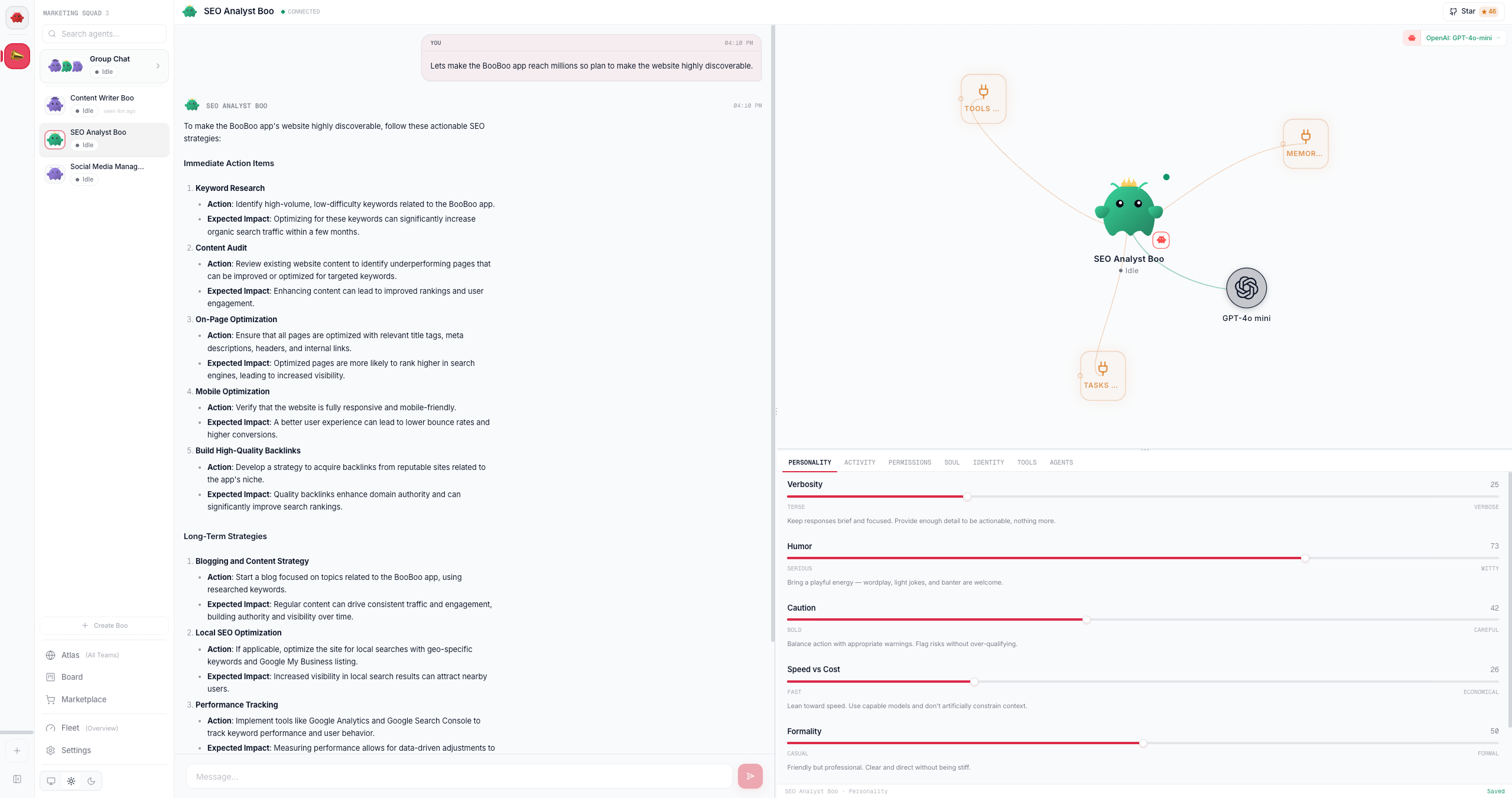
The view is a 3-panel resizable layout under one shared 44 px header (the agent's avatar, name, connection dot, and the GitHub Star pill):
```
┌─────────────────────┬──────────────────────────┐
│ │ MiniGraph (55%) │
│ ChatPanel (45%) ├──────────────────────────┤
│ │ InlineEditor (45%) │
└─────────────────────┴──────────────────────────┘
```
| Panel | What it is |
| ------------------------------------- | ---------------------------------------------------------------------------------------------------------------------------------------------------------------------------------------------------------------------- |
| **Chat** (left, 45%) | A 1:1 chat with this Boo. The panel's own header is suppressed; identity lives in the shared row above. The transcript renders its most recent \~150 messages, with **Load earlier messages** at the top for the rest. |
| **MiniGraph** (top-right, 55%) | A compact React Flow canvas of this Boo plus its skills and resources, with drag-to-install. |
| **Inline editor** (bottom-right, 45%) | The tabbed editor: personality, permissions, activity, and the agent files. |
The panel split sizes persist to `localStorage` (the `Group` has an `id`), so your layout survives a reload. Drag a `ResizeHandle` to resize.
The MiniGraph header fuses the agent's **runtime icon** with a **model selector** for changing this agent's model. A native (`clawboo-native`) agent picks from the native model catalog and the change is saved to its `AgentConfig` via `PATCH /api/agents/:agentId/model` (no Gateway needed); an OpenClaw agent picks from the OpenClaw catalog and the change is written as a per-agent override in `openclaw.json`; a **Hermes** agent picks from the live OpenRouter catalog (stored in `execConfig`, routed through OpenRouter). **Codex** and **Claude Code** run their account/SDK default, so they show a "runtime-managed model" note instead of a picker.
 ## Edit the agent files
The inline editor's file tabs are a single CodeMirror 6 instance (Markdown highlighting, line wrapping). The four **core** tabs always show; the three extra OpenClaw files appear as tabs only when they already have content.
| File | Tab | What it controls |
| -------------- | --------- | ------------------------------------------------------------------------------------------------ |
| `SOUL.md` | SOUL | Persona, tone, and boundaries. Also holds the merged personality block (see below). |
| `IDENTITY.md` | IDENTITY | Name, vibe, and emoji. |
| `TOOLS.md` | TOOLS | Local tool notes and conventions. Drives the skill nodes on the graph. |
| `AGENTS.md` | AGENTS | Operating instructions, priorities, and routing rules. Drives the dependency edges on the graph. |
| `USER.md` | USER | User profile and preferences (extra tab, shown when non-empty). |
| `HEARTBEAT.md` | HEARTBEAT | Checklist for heartbeat runs (extra tab). |
| `MEMORY.md` | MEMORY | Durable per-agent memory (extra tab). |
### Steps
1. **Pick a file tab.** The active tab gets an accent underline; the CodeMirror document swaps to that file's content. All seven files are loaded in parallel when the view opens.
2. **Edit.** A modified tab shows an amber dot. The whole editor footer reads **Unsaved** while any file is dirty.
3. **Save.** Click **Save**, or press `Cmd/Ctrl+S`. The write goes through a per-agent mutation queue (serialized so concurrent writes never race) to `PUT /api/agents/:agentId/files/:name`, and a toast confirms `Saved `.
4. **Saving TOOLS.md or AGENTS.md** also triggers a Ghost Graph refresh, so new skill nodes or routing edges appear without a manual reload.
You don't have to save before switching agents or leaving the view; the editor saves all dirty files automatically on unmount (best-effort). Saving explicitly is still safer when the connection is flaky.
## Tune the personality
The **Personality** tab has five sliders, each 0–100. Moving a slider does not save; the save fires on pointer-up (the commit). Each slider shows a one-line description that updates live as you drag.
| Dimension | 0 (left) | 100 (right) |
| ------------- | -------- | ----------- |
| Verbosity | Terse | Verbose |
| Humor | Serious | Witty |
| Caution | Bold | Careful |
| Speed vs Cost | Fast | Economical |
| Formality | Casual | Formal |
### Where values persist
A commit writes to **two** places:
1. **SQLite** (`POST /api/personality`): the source of truth for the slider values. The handler stores a `{ values, customText }` JSON wrapper in the agent's `personality_config` column (upserting the agent row if it doesn't exist yet).
2. **`SOUL.md`** (best-effort): the sliders are rendered into Markdown sections and merged into `SOUL.md` below a `---` separator and a \`\`marker. The merge reads the current`SOUL.md`, strips any old personality block, preserves the role description above the separator, and writes the result back.
Because SQLite is authoritative, the slider positions survive even if the `SOUL.md` write fails. When the detail view loads `SOUL.md`, it strips the stale personality block and re-merges the SQLite values, so the editor's SOUL tab always reflects the current sliders.
Writes through the Gateway's agent-file API are best-effort and may not persist, so the slider values live in SQLite as the source of truth. Treat the `SOUL.md` block as a generated projection of the SQLite source, not the other way around.
### Custom instructions instead of sliders
Click **Use Custom Instructions** to switch to a free-text override. The textarea content saves on blur or `Cmd/Ctrl+S` (`POST /api/personality` with `customText`), and is merged into `SOUL.md` under a \`\` marker; it **overrides** the slider-generated block. **Switch to Sliders** clears the custom text and restores the slider personality.
The footer's **Preview SOUL.md** toggle shows the merged result (role description plus the active personality block) so you can see exactly what the runtime will read.
## The other editor tabs
| Tab | What it shows |
| --------------- | ---------------------------------------------------------------------------------------------------------------------------------------------------- |
| **Permissions** | Per-agent exec settings (`ExecSettings`): the runtime's tool/exec permission knobs. |
| **Activity** | The live observability terminal scoped to this agent: tool calls, results, and errors as they stream. |
| **Brief** | Boo Zero only. Holds Boo Zero's display name override and Global Brief (its load-bearing identity surface). The tab is hidden for every other agent. |
## Create a Boo
Click **Create Boo** in the agent list (or the fleet sidebar) to open `CreateBooModal`.
1. Enter a **Name** (required) and an optional **Role** (free text that becomes the base `SOUL.md`).
2. Click **Create Boo** (or press Enter). The modal:
* merges the default personality (all five sliders at 50) into the role text and creates the agent via `POST /api/agents`; the server resolves the workspace and writes `SOUL.md`, `IDENTITY.md`, and `TOOLS.md`;
* persists the default personality to SQLite (`POST /api/personality`);
* assigns the new Boo to the currently selected team (best-effort) via `POST /api/teams/:id/agents`.
Create requires a connected runtime. With no connection the modal shows **Not connected to Gateway** and does nothing. A name collision with an existing agent surfaces as a create error.
## Delete a Boo
Hover a Boo in the agent list and click the trash icon. `deleteAgentOperation`:
1. archives the agent via `DELETE /api/agents/:agentId`; the server deletes it upstream (the Gateway) and removes the SQLite row plus its FK-referenced cost/approval rows. If the connection is down, the server falls back to a SQLite-only cleanup and returns `{ ok: true, upstreamDeleted: false }`;
2. removes it from the in-memory fleet store;
3. re-identifies [Boo Zero](/appendices/glossary) from the remaining agents (in case the deleted Boo was the leader);
4. clears its transcript and deletes its chat history.
Deletion is not reversible. The agent's files and config are removed from both the runtime and SQLite. There is no undo.
## Verify it worked
* **File save**: re-open the file tab (or reload the view) and confirm the saved content is loaded back from `GET /api/agents/:agentId/files/:name`. The footer reads **Saved**.
* **Personality**: reload the detail view; the sliders should restore their saved positions (read from `GET /api/personality?agentId=...`), and **Preview SOUL.md** should show the matching personality block.
* **Create / delete**: the agent appears in (or disappears from) the agent list. After a create, `GET /api/agents` includes the new record.
## Troubleshooting
**Edits don't save.** The editor and sliders write through the connected runtime. If the connection dot in the header is amber, file writes return `503` and slider commits silently fail. Reconnect the runtime, then retry the save.
**Personality slider moved back after I switched agents.** A slider commit fires on pointer-up; a drag with no release doesn't save. Release the thumb (or use a keyboard arrow + release) to commit, and watch for the **Saved ✓** indicator.
**An invalid file name returns 400.** The file routes validate `:name` against the seven known agent files (`AGENTS.md`, `SOUL.md`, `IDENTITY.md`, `USER.md`, `TOOLS.md`, `HEARTBEAT.md`, `MEMORY.md`). Any other name is rejected with `{ error: "invalid file name" }`.
## See also
* [Ghost Graph](/using/ghost-graph), the per-agent mini-graph and the team-wide canvas
* [Group chat](/using/group-chat), work with a whole team at once
* [Boo Zero](/using/boo-zero), the universal team leader's Brief and rules
* [`/api/agents` reference](/reference/rest-api/agents), full request/response shapes for the registry, files, and sessions
* [Glossary](/appendices/glossary), Boo, Boo Zero, AgentSource, registry of record
## Edit the agent files
The inline editor's file tabs are a single CodeMirror 6 instance (Markdown highlighting, line wrapping). The four **core** tabs always show; the three extra OpenClaw files appear as tabs only when they already have content.
| File | Tab | What it controls |
| -------------- | --------- | ------------------------------------------------------------------------------------------------ |
| `SOUL.md` | SOUL | Persona, tone, and boundaries. Also holds the merged personality block (see below). |
| `IDENTITY.md` | IDENTITY | Name, vibe, and emoji. |
| `TOOLS.md` | TOOLS | Local tool notes and conventions. Drives the skill nodes on the graph. |
| `AGENTS.md` | AGENTS | Operating instructions, priorities, and routing rules. Drives the dependency edges on the graph. |
| `USER.md` | USER | User profile and preferences (extra tab, shown when non-empty). |
| `HEARTBEAT.md` | HEARTBEAT | Checklist for heartbeat runs (extra tab). |
| `MEMORY.md` | MEMORY | Durable per-agent memory (extra tab). |
### Steps
1. **Pick a file tab.** The active tab gets an accent underline; the CodeMirror document swaps to that file's content. All seven files are loaded in parallel when the view opens.
2. **Edit.** A modified tab shows an amber dot. The whole editor footer reads **Unsaved** while any file is dirty.
3. **Save.** Click **Save**, or press `Cmd/Ctrl+S`. The write goes through a per-agent mutation queue (serialized so concurrent writes never race) to `PUT /api/agents/:agentId/files/:name`, and a toast confirms `Saved `.
4. **Saving TOOLS.md or AGENTS.md** also triggers a Ghost Graph refresh, so new skill nodes or routing edges appear without a manual reload.
You don't have to save before switching agents or leaving the view; the editor saves all dirty files automatically on unmount (best-effort). Saving explicitly is still safer when the connection is flaky.
## Tune the personality
The **Personality** tab has five sliders, each 0–100. Moving a slider does not save; the save fires on pointer-up (the commit). Each slider shows a one-line description that updates live as you drag.
| Dimension | 0 (left) | 100 (right) |
| ------------- | -------- | ----------- |
| Verbosity | Terse | Verbose |
| Humor | Serious | Witty |
| Caution | Bold | Careful |
| Speed vs Cost | Fast | Economical |
| Formality | Casual | Formal |
### Where values persist
A commit writes to **two** places:
1. **SQLite** (`POST /api/personality`): the source of truth for the slider values. The handler stores a `{ values, customText }` JSON wrapper in the agent's `personality_config` column (upserting the agent row if it doesn't exist yet).
2. **`SOUL.md`** (best-effort): the sliders are rendered into Markdown sections and merged into `SOUL.md` below a `---` separator and a \`\`marker. The merge reads the current`SOUL.md`, strips any old personality block, preserves the role description above the separator, and writes the result back.
Because SQLite is authoritative, the slider positions survive even if the `SOUL.md` write fails. When the detail view loads `SOUL.md`, it strips the stale personality block and re-merges the SQLite values, so the editor's SOUL tab always reflects the current sliders.
Writes through the Gateway's agent-file API are best-effort and may not persist, so the slider values live in SQLite as the source of truth. Treat the `SOUL.md` block as a generated projection of the SQLite source, not the other way around.
### Custom instructions instead of sliders
Click **Use Custom Instructions** to switch to a free-text override. The textarea content saves on blur or `Cmd/Ctrl+S` (`POST /api/personality` with `customText`), and is merged into `SOUL.md` under a \`\` marker; it **overrides** the slider-generated block. **Switch to Sliders** clears the custom text and restores the slider personality.
The footer's **Preview SOUL.md** toggle shows the merged result (role description plus the active personality block) so you can see exactly what the runtime will read.
## The other editor tabs
| Tab | What it shows |
| --------------- | ---------------------------------------------------------------------------------------------------------------------------------------------------- |
| **Permissions** | Per-agent exec settings (`ExecSettings`): the runtime's tool/exec permission knobs. |
| **Activity** | The live observability terminal scoped to this agent: tool calls, results, and errors as they stream. |
| **Brief** | Boo Zero only. Holds Boo Zero's display name override and Global Brief (its load-bearing identity surface). The tab is hidden for every other agent. |
## Create a Boo
Click **Create Boo** in the agent list (or the fleet sidebar) to open `CreateBooModal`.
1. Enter a **Name** (required) and an optional **Role** (free text that becomes the base `SOUL.md`).
2. Click **Create Boo** (or press Enter). The modal:
* merges the default personality (all five sliders at 50) into the role text and creates the agent via `POST /api/agents`; the server resolves the workspace and writes `SOUL.md`, `IDENTITY.md`, and `TOOLS.md`;
* persists the default personality to SQLite (`POST /api/personality`);
* assigns the new Boo to the currently selected team (best-effort) via `POST /api/teams/:id/agents`.
Create requires a connected runtime. With no connection the modal shows **Not connected to Gateway** and does nothing. A name collision with an existing agent surfaces as a create error.
## Delete a Boo
Hover a Boo in the agent list and click the trash icon. `deleteAgentOperation`:
1. archives the agent via `DELETE /api/agents/:agentId`; the server deletes it upstream (the Gateway) and removes the SQLite row plus its FK-referenced cost/approval rows. If the connection is down, the server falls back to a SQLite-only cleanup and returns `{ ok: true, upstreamDeleted: false }`;
2. removes it from the in-memory fleet store;
3. re-identifies [Boo Zero](/appendices/glossary) from the remaining agents (in case the deleted Boo was the leader);
4. clears its transcript and deletes its chat history.
Deletion is not reversible. The agent's files and config are removed from both the runtime and SQLite. There is no undo.
## Verify it worked
* **File save**: re-open the file tab (or reload the view) and confirm the saved content is loaded back from `GET /api/agents/:agentId/files/:name`. The footer reads **Saved**.
* **Personality**: reload the detail view; the sliders should restore their saved positions (read from `GET /api/personality?agentId=...`), and **Preview SOUL.md** should show the matching personality block.
* **Create / delete**: the agent appears in (or disappears from) the agent list. After a create, `GET /api/agents` includes the new record.
## Troubleshooting
**Edits don't save.** The editor and sliders write through the connected runtime. If the connection dot in the header is amber, file writes return `503` and slider commits silently fail. Reconnect the runtime, then retry the save.
**Personality slider moved back after I switched agents.** A slider commit fires on pointer-up; a drag with no release doesn't save. Release the thumb (or use a keyboard arrow + release) to commit, and watch for the **Saved ✓** indicator.
**An invalid file name returns 400.** The file routes validate `:name` against the seven known agent files (`AGENTS.md`, `SOUL.md`, `IDENTITY.md`, `USER.md`, `TOOLS.md`, `HEARTBEAT.md`, `MEMORY.md`). Any other name is rejected with `{ error: "invalid file name" }`.
## See also
* [Ghost Graph](/using/ghost-graph), the per-agent mini-graph and the team-wide canvas
* [Group chat](/using/group-chat), work with a whole team at once
* [Boo Zero](/using/boo-zero), the universal team leader's Brief and rules
* [`/api/agents` reference](/reference/rest-api/agents), full request/response shapes for the registry, files, and sessions
* [Glossary](/appendices/glossary), Boo, Boo Zero, AgentSource, registry of record