> ## Documentation Index
> Fetch the complete documentation index at: https://docs.claw.boo/llms.txt
> Use this file to discover all available pages before exploring further.
# Deploy your first team
> Deploy a team of agents, run the Know-Your-Team gate, send a message in group chat, and watch a delegation land on the board.
By the end of this tutorial you'll have a team of agents in Clawboo, you'll have run the one-time "Know Your Team" introduction flow, and you'll have sent a message in group chat and watched the team leader delegate a task onto the durable board.
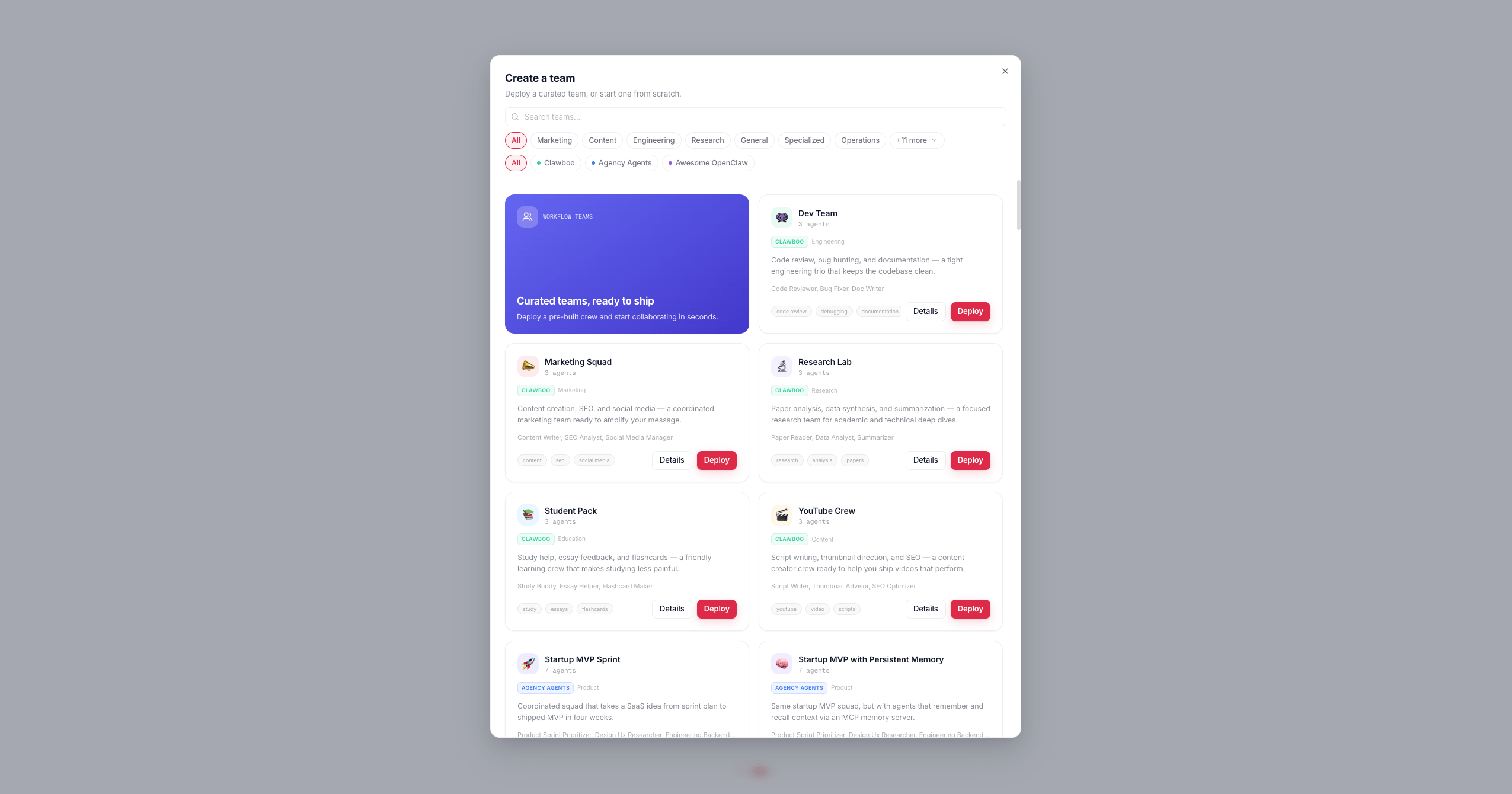
A *team* is a named group of Boos (agents) that collaborate in one shared chat room. Clawboo gives you two ways to deploy one: pick a ready-made template from the marketplace catalog (82 teams, 304 agents), or, on the native-first path, let onboarding seed a starter team for you. This tutorial covers both, then walks the same group-chat-and-board collaboration loop that follows either.
These docs describe Clawboo **v0.3.1**, the current release.
## Prerequisites
* A running Clawboo dashboard. If you haven't installed it yet, start with [Quickstart, native](/getting-started/quickstart-native) (no Gateway) or [Quickstart, OpenClaw](/getting-started/quickstart-openclaw).
* At least one connected runtime. Either path in this tutorial works:
* **Native**: you pasted a provider key during native onboarding, and a starter team was already seeded for you.
* **OpenClaw**: your OpenClaw Gateway is connected, so you can deploy a marketplace-template team of OpenClaw agents.
Team chat and delegation run **server-side** and work for every runtime, including a native-only team with no Gateway. The composer is live as soon as the team has agents, and a delegation cascade keeps running even if you close the browser tab.
## Steps
### 1. Get a team
You either already have one (from native onboarding) or you deploy one now.
**You already have a team.** During native onboarding you picked a starter team from the marketplace and deployed it (every agent `clawboo-native`). The wizard's "Your team is ready" screen was that team's **Meet your team** beat, so its group chat opens directly on the **introduce yourself** step. Skip to [step 3](#3-run-the-know-your-team-gate) and start from the second screen there; your team already exists.
**Deploy a template team.** The **+** button in the leftmost sidebar takes you to the Marketplace's **Teams** tab (the catalog of 82 teams, 304 agents). Press **Deploy** on a team card, then customize its name, icon, color, and the runtime each member runs on. You can mix runtimes: a native leader with a Claude Code or OpenClaw specialist, for example. (Prefer a blank team? Use the **Start from scratch** card on that same tab.)
 **Expected result:** the create-team modal advances to a deploy screen: the team icon you picked, animating, above a **Deploying** heading that carries your team's name.
### 2. Watch the team deploy
Clawboo now creates the team and its agents in order:
1. **`POST /api/teams`** creates the team row (name, icon, color, the template id).
2. For each agent in the template, **`createAgent`** writes its four agent files: `SOUL.md`, `IDENTITY.md`, `TOOLS.md`, and a collaboration-protocol `AGENTS.md`, then **`POST /api/teams/:id/agents`** assigns it to the team. The protocol file teaches each agent the team roster and the structured `task` syntax it uses to route work.
3. If the template defines `@mention` routing, agent-to-agent coordination is auto-enabled.
The deploy screen tracks this live: a **Creating *agent name*…** line names the agent being written right now, and a progress bar under it counts `N/M agents`. When the last one lands, the screen flips to a check mark and **"Team deployed!"**, then the modal hands you off.
**Expected result:** after the brief **"Team deployed!"** beat the modal closes itself and you land directly in your new team's group chat, with a success toast confirming the agent count. There is no separate "done" dialog to dismiss.
### 3. Run the "Know Your Team" gate
The first time you open a team's group chat, a one-time onboarding gate fills the window *instead of* the chat. This is the **Know Your Team** flow, and it runs once per team.
The gate has two phases:
1. **Meet your team**: a welcome card showing each agent's avatar and, when Boo Zero (the universal team leader) is identified, a "Led by ..." badge. The copy explains that your team is led by Boo Zero, who takes your request and routes it to the right specialist. Click **Get Started**.
2. **Your turn**: a textarea asks you to introduce yourself ("your name, what you're working on, how you'd like the team to help"). Type a short intro and click **Continue to Team Space**.
A team deployed during onboarding opens straight on phase 2: the wizard's "Your team is ready" screen already showed you the same **Meet your team** card, so the gate does not repeat it.
Your introduction is persisted to SQLite as the source of truth and injected into the team's context preamble on every future message, so every agent always sees it, and Boo Zero replies in-character to acknowledge it.
**Expected result:** the gate closes and the settled **team space** opens, the team's [Ghost Graph](/using/group-chat) on top, the group chat below. You learn what each teammate does by watching the first real task in action, not from a scripted intro round.
### 4. Send a message in group chat
You're now in normal group chat. Type a request into the composer at the bottom and send it.
Your message routes to the team's leader by default (Boo Zero, or the first team member). To address a specific agent, start your message with `@AgentName`; the longest-prefix match against the roster wins, and the @mention is stripped before delivery.
**Expected result:** the leader starts responding, its reply streaming live into the transcript with its own avatar and name.
### 5. Watch a delegation land on the board
When the leader decides a request needs hands-on work, it emits a structured `task` directive in its response. Clawboo's orchestration engine, which observes every team member's session, turns that directive into a durable [board](/concepts/the-board) task; it does *not* scrape prose for intent.
For each delegation, the engine:
1. **Creates a board task** and **atomically claims** it for the target agent (a lost claim is a conflict, never retried).
2. **Delivers the task** to that agent's session through a non-destructive queue (a busy agent's task waits for its turn boundary; it never interrupts an in-flight run).
3. **Reports the result back** when the agent finishes: the task moves to `done` and a report-up summary lands on the board.
You see this in the chat as a **Board task** card, a labeled row with a status pill that flips live from **Queued** to **Working** to **Done**, plus the assignee's avatar and name. The board is the source of truth; the card is a read-only projection of it, so it survives a page refresh. Completed tasks are also batched into a `[Task Update]` narration delivered back to the leader for synthesis.
**Expected result:** at least one Board task card appears inline in the chat, its status pill advancing to **Done**, and the leader synthesizes the teammate's work back to you.
## What you should see
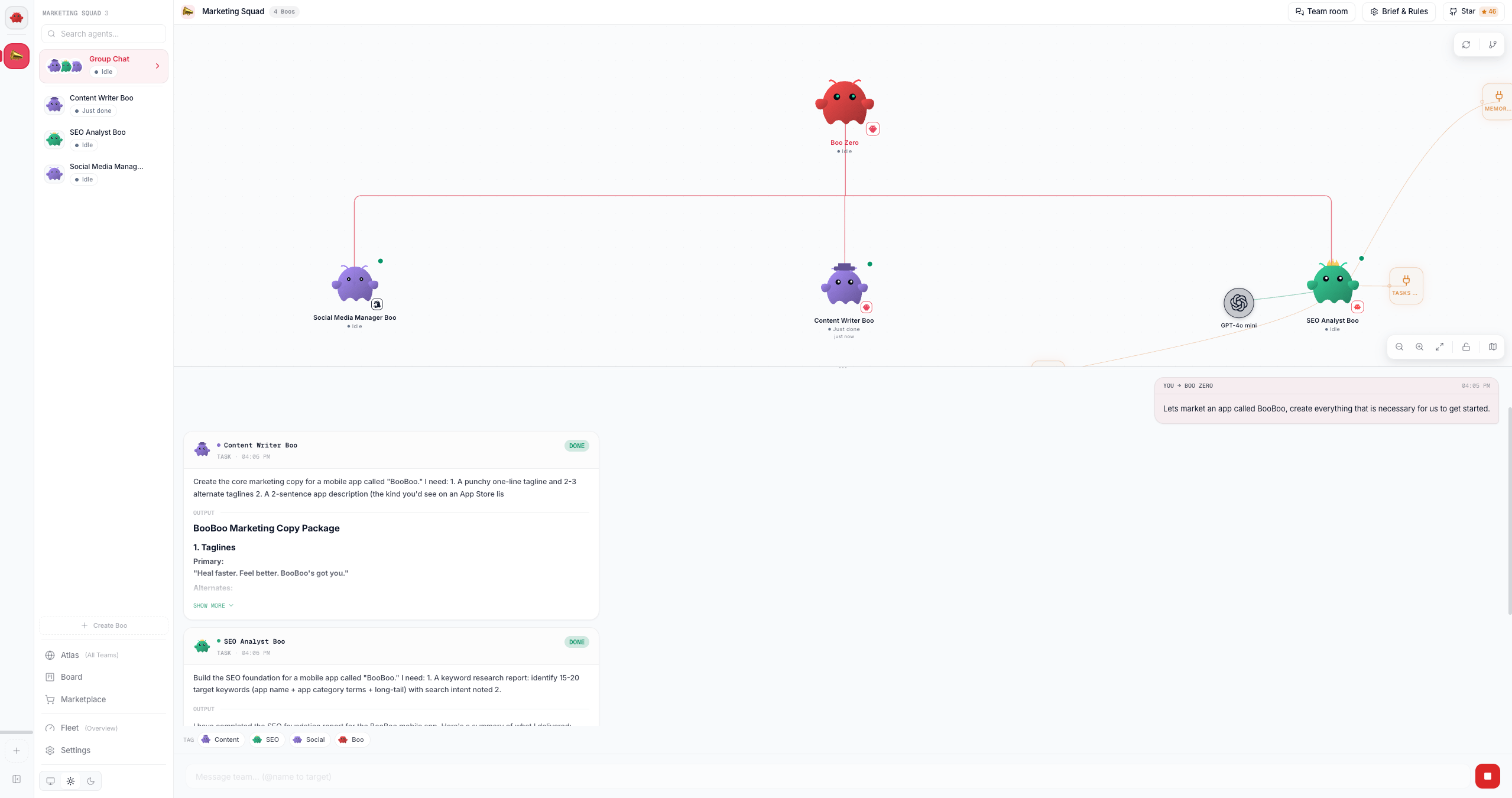
The settled team space puts the team's Ghost Graph on top and the group chat below, with Board task cards interleaved into the conversation as delegations land:
**Expected result:** the create-team modal advances to a deploy screen: the team icon you picked, animating, above a **Deploying** heading that carries your team's name.
### 2. Watch the team deploy
Clawboo now creates the team and its agents in order:
1. **`POST /api/teams`** creates the team row (name, icon, color, the template id).
2. For each agent in the template, **`createAgent`** writes its four agent files: `SOUL.md`, `IDENTITY.md`, `TOOLS.md`, and a collaboration-protocol `AGENTS.md`, then **`POST /api/teams/:id/agents`** assigns it to the team. The protocol file teaches each agent the team roster and the structured `task` syntax it uses to route work.
3. If the template defines `@mention` routing, agent-to-agent coordination is auto-enabled.
The deploy screen tracks this live: a **Creating *agent name*…** line names the agent being written right now, and a progress bar under it counts `N/M agents`. When the last one lands, the screen flips to a check mark and **"Team deployed!"**, then the modal hands you off.
**Expected result:** after the brief **"Team deployed!"** beat the modal closes itself and you land directly in your new team's group chat, with a success toast confirming the agent count. There is no separate "done" dialog to dismiss.
### 3. Run the "Know Your Team" gate
The first time you open a team's group chat, a one-time onboarding gate fills the window *instead of* the chat. This is the **Know Your Team** flow, and it runs once per team.
The gate has two phases:
1. **Meet your team**: a welcome card showing each agent's avatar and, when Boo Zero (the universal team leader) is identified, a "Led by ..." badge. The copy explains that your team is led by Boo Zero, who takes your request and routes it to the right specialist. Click **Get Started**.
2. **Your turn**: a textarea asks you to introduce yourself ("your name, what you're working on, how you'd like the team to help"). Type a short intro and click **Continue to Team Space**.
A team deployed during onboarding opens straight on phase 2: the wizard's "Your team is ready" screen already showed you the same **Meet your team** card, so the gate does not repeat it.
Your introduction is persisted to SQLite as the source of truth and injected into the team's context preamble on every future message, so every agent always sees it, and Boo Zero replies in-character to acknowledge it.
**Expected result:** the gate closes and the settled **team space** opens, the team's [Ghost Graph](/using/group-chat) on top, the group chat below. You learn what each teammate does by watching the first real task in action, not from a scripted intro round.
### 4. Send a message in group chat
You're now in normal group chat. Type a request into the composer at the bottom and send it.
Your message routes to the team's leader by default (Boo Zero, or the first team member). To address a specific agent, start your message with `@AgentName`; the longest-prefix match against the roster wins, and the @mention is stripped before delivery.
**Expected result:** the leader starts responding, its reply streaming live into the transcript with its own avatar and name.
### 5. Watch a delegation land on the board
When the leader decides a request needs hands-on work, it emits a structured `task` directive in its response. Clawboo's orchestration engine, which observes every team member's session, turns that directive into a durable [board](/concepts/the-board) task; it does *not* scrape prose for intent.
For each delegation, the engine:
1. **Creates a board task** and **atomically claims** it for the target agent (a lost claim is a conflict, never retried).
2. **Delivers the task** to that agent's session through a non-destructive queue (a busy agent's task waits for its turn boundary; it never interrupts an in-flight run).
3. **Reports the result back** when the agent finishes: the task moves to `done` and a report-up summary lands on the board.
You see this in the chat as a **Board task** card, a labeled row with a status pill that flips live from **Queued** to **Working** to **Done**, plus the assignee's avatar and name. The board is the source of truth; the card is a read-only projection of it, so it survives a page refresh. Completed tasks are also batched into a `[Task Update]` narration delivered back to the leader for synthesis.
**Expected result:** at least one Board task card appears inline in the chat, its status pill advancing to **Done**, and the leader synthesizes the teammate's work back to you.
## What you should see
The settled team space puts the team's Ghost Graph on top and the group chat below, with Board task cards interleaved into the conversation as delegations land:
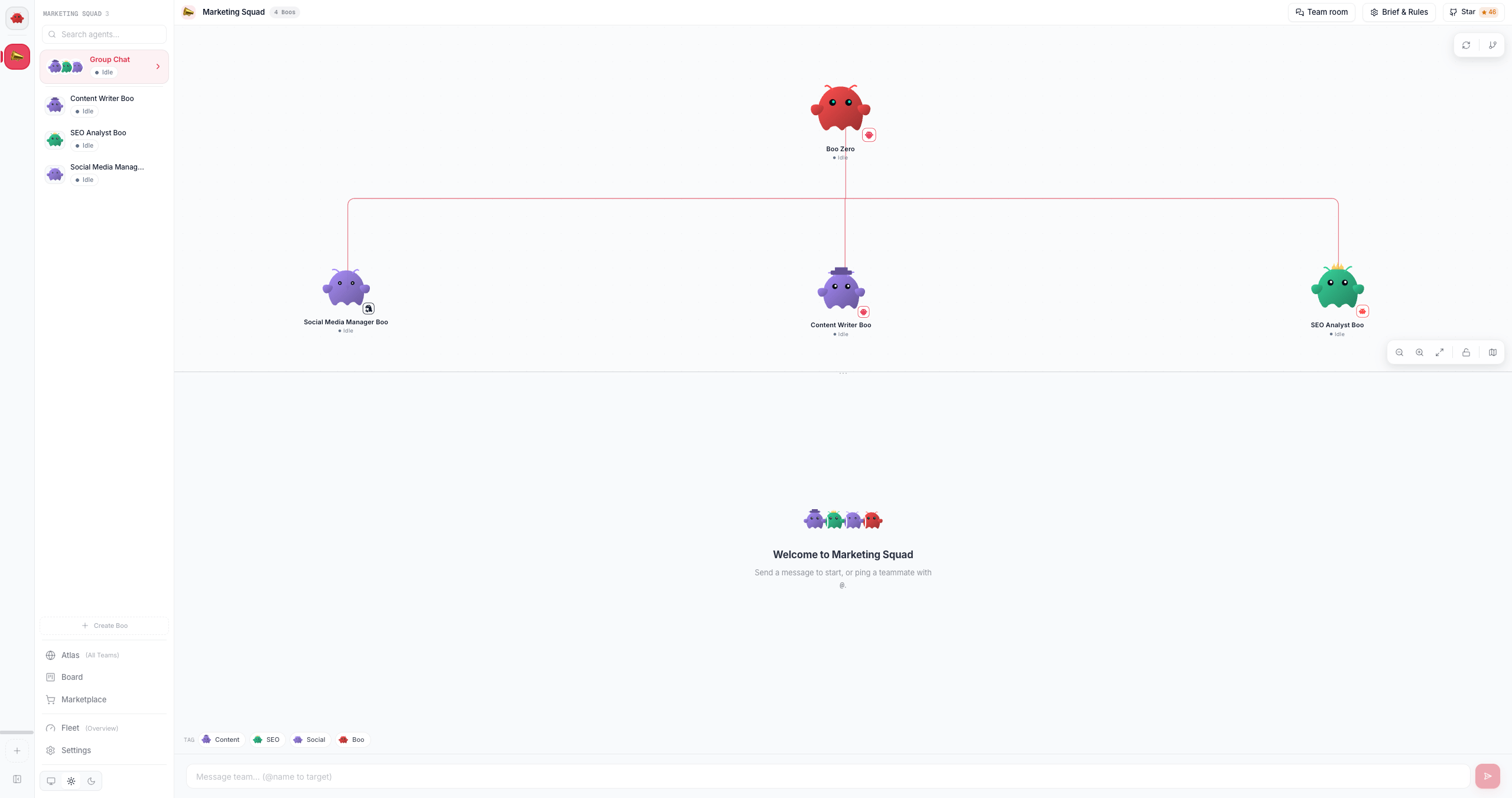
 The Ghost Graph itself renders the team as an org chart, the leader at the top, teammates below, and the `@mention` routing from each agent's `AGENTS.md` drawn as edges:
 ## What just happened
Deploying a team created real agent records in SQLite, the [registry of record](/appendices/glossary) for which agents and teams exist, and wrote each agent's collaboration protocol into its `AGENTS.md`, which is what teaches the leader the `` syntax and seeds the Ghost Graph's edges. The Know-Your-Team gate ran once so you could meet the team and introduce yourself, persisting your introduction so every future message carries it. Then, in chat, the leader's structured delegation became a durable board task: the server-side orchestration engine derives tasks from typed signals rather than parsing prose, claims each task race-free, and reflects the result back, which is why the work survives a refresh (and a tab close) and the leader is never left waiting on a silent teammate.
## Next steps
* [The board](/concepts/the-board), the durable, race-free coordination substrate behind every delegation
* [Delegation and orchestration](/concepts/delegation-and-orchestration), how structured signals become board tasks
* [Peer chat](/concepts/peer-chat), how mixed-runtime agents talk to each other as named peers
* [Using group chat](/using/group-chat), the group-chat surface in depth, including the gate
* [Tour the dashboard: Atlas, Ghost Graph, and the view modes](/getting-started/dashboard-tour)
## What just happened
Deploying a team created real agent records in SQLite, the [registry of record](/appendices/glossary) for which agents and teams exist, and wrote each agent's collaboration protocol into its `AGENTS.md`, which is what teaches the leader the `` syntax and seeds the Ghost Graph's edges. The Know-Your-Team gate ran once so you could meet the team and introduce yourself, persisting your introduction so every future message carries it. Then, in chat, the leader's structured delegation became a durable board task: the server-side orchestration engine derives tasks from typed signals rather than parsing prose, claims each task race-free, and reflects the result back, which is why the work survives a refresh (and a tab close) and the leader is never left waiting on a silent teammate.
## Next steps
* [The board](/concepts/the-board), the durable, race-free coordination substrate behind every delegation
* [Delegation and orchestration](/concepts/delegation-and-orchestration), how structured signals become board tasks
* [Peer chat](/concepts/peer-chat), how mixed-runtime agents talk to each other as named peers
* [Using group chat](/using/group-chat), the group-chat surface in depth, including the gate
* [Tour the dashboard: Atlas, Ghost Graph, and the view modes](/getting-started/dashboard-tour)